
Why an Internal Link Audit Is the SEO Growth Lever You’re Overlooking
An internal link audit is the process of reviewing every link on your website that points to another page on the same site — so you can fix what’s broken, strengthen what’s weak, and make sure your most important pages are getting the attention they deserve from Google.
Here’s what an internal link audit covers:
- Find orphan pages – pages with zero internal links that Google struggles to discover
- Identify buried pages – important content sitting 4+ clicks from your homepage
- Fix broken links – 404 errors and redirect chains wasting your crawl budget
- Spot under-linked pages – high-value content that isn’t getting enough internal link support
- Optimize anchor text – making sure your link text tells Google what each page is about
- Strengthen topical clusters – connecting related content so Google sees your site as an authority
Most small business websites have a distribution problem, not a content problem. You could have 50 well-written blog posts and still see almost no traffic — simply because those pages aren’t properly linked together.
Research shows that website owners miss more than 80% of their internal link opportunities. Meanwhile, pages with consistent internal links get crawled more often, indexed faster, and earn significantly more clicks from Google Search than pages with weak internal connections.
The fix isn’t always more content. Sometimes it’s just better connections between the content you already have.
I’m Carlos Alvarez, founder of Baseline Digital Marketing Agency, where I’ve helped businesses of all sizes diagnose and fix exactly this kind of silent SEO problem through strategic internal link audits. In this guide, I’ll walk you through the exact process we use to uncover hidden ranking opportunities and turn an underperforming site into one that Google actually wants to crawl and rank.
Why an Internal Link Audit is the Ultimate SEO Growth Lever
When search engines crawl the web, they don’t just evaluate pages in isolation. Google uses links to discover new URLs, map out your site’s structure, and understand the contextual relationships between different topics. If you think of your website as a physical house, your pages are the rooms and your internal links are the hallways. Without hallways, your visitors (and Googlebot) are stuck in the foyer.
Historically, SEOs focused heavily on external link building, treating internal links as an afterthought. But as search technology has evolved, the industry has realized that internal linking is the single highest-leverage optimization lever you fully control. You don’t need to pitch journalists or guest post on third-party blogs to build internal links; you can adjust them instantly in your own CMS.
This is why understanding how to structure your internal links is so critical. For a deeper dive into the foundational concepts, you can read Semrush’s guide on internal linking strategies.
From a strategic perspective, executing a regular internal link audit is essential for several reasons:
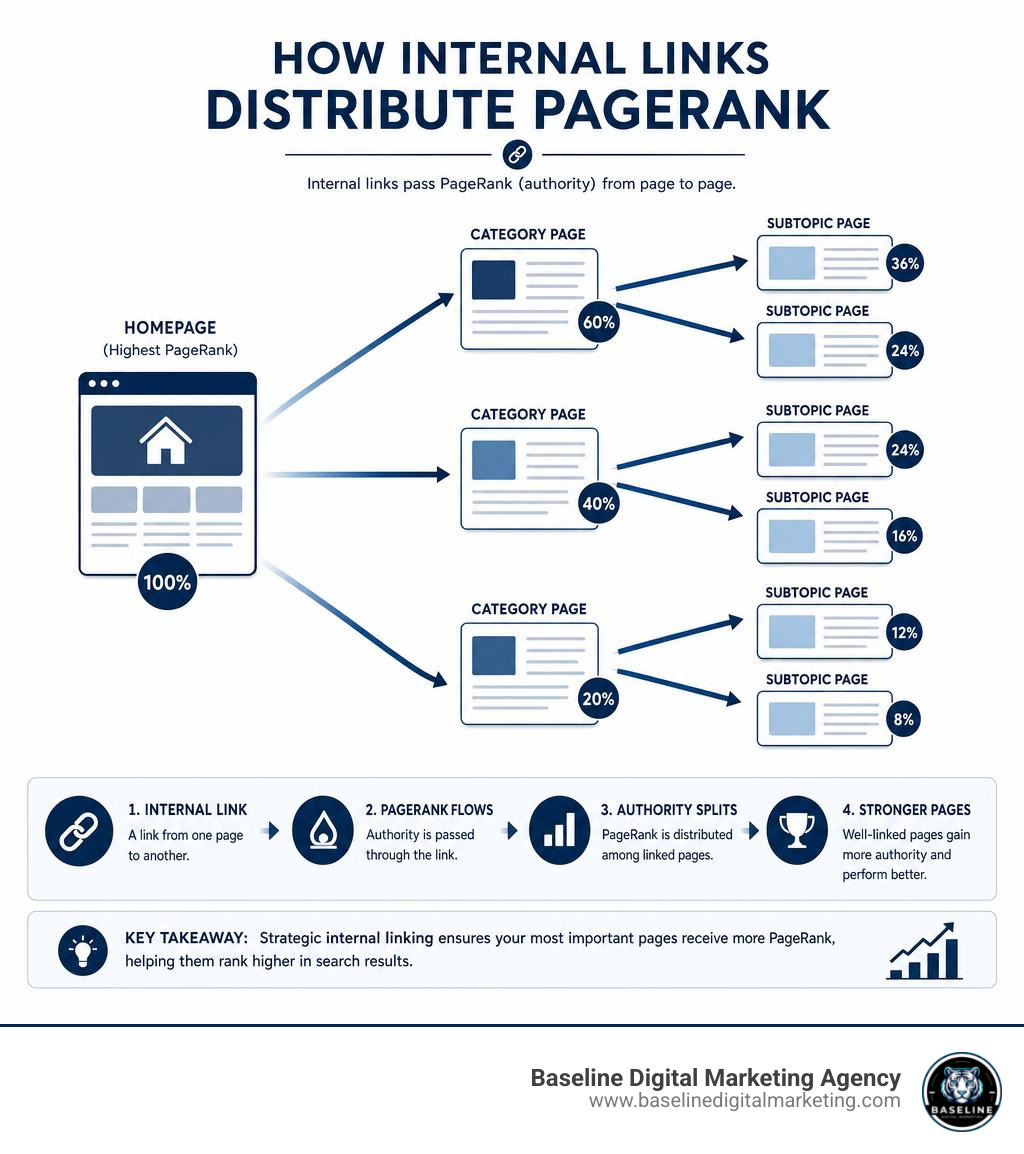
- Topical PageRank & Authority Distribution: External links bring “link juice” (PageRank) to your site, usually pointing to your homepage or a few key resources. Internal links act as the distribution network, funneling that authority to your deep commercial pages.
- Semantic Search Context: Modern search engines use semantic processing to understand the meaning behind terms. If a page mentions the word “Queen,” is it referring to the legendary British rock band, a chess piece, or the British monarch? The surrounding text and the internal links pointing to and from that page clarify this intent for search algorithms.
- Crawl Efficiency: With Google holding an 89.9% worldwide search market share in May 2026, its crawlers are busier than ever. Efficient internal linking ensures Googlebot doesn’t waste time on duplicate or low-value pages while ignoring your primary conversion assets.
To read more about why clean architecture matters, check out seoClarity’s explanation on why to audit internal links.
How Google Treats Different Types of Internal Links
Not all links are created equal in the eyes of search engines. Google assigns different weight and contextual value based on where a link is placed and how it is formatted. According to Moz’s guide on internal linking best practices, understanding these distinctions is key to a successful site architecture.
- Navigational Links: These are the links in your primary header menu. They are sitewide links, meaning they appear on every single page of your website. Google uses these to understand your core taxonomy and identify your most important cornerstone pages.
- Contextual Links: These are links embedded directly within the body text of your content. They are highly valuable because they carry surrounding contextual signals. Google’s algorithms look at the paragraph containing the link to understand the relationship between the source and target pages.
- Breadcrumbs: Breadcrumb navigation helps both users and search engines understand hierarchical relationships (e.g., Home > Blog > SEO > Internal Linking). Google heavily relies on breadcrumbs to map out site structures and may display them directly in search result snippets.
- Footer and Sidebar Links: While useful for utility pages (like your Privacy Policy or Terms of Service), footer and sidebar links are generally passed less weight by Google than contextual links within the main body content. Overloading your footer with keyword-rich links can look manipulative and dilute your overall link equity.
- Image Links: When you use an image as a link, Google treats the image’s
alttext as the anchor text. If the alt text is missing, the link loses much of its contextual value.
For a comprehensive breakdown of these link types, read Americaneagle.com’s SEO internal linking best practices.
The Impact of PageRank and Crawl Budget on Rankings
To understand why an internal link audit yields such massive organic growth, we have to look at the mechanics of PageRank and crawl budget.
PageRank is calculated at the page level, not the domain level. When a high-authority external site links to your blog post, that blog post accumulates PageRank. If that post has no outbound internal links, that authority hits a dead end. However, if you link from that high-authority blog post to a core product page, a portion of that PageRank flows directly to your product page, boosting its ranking potential.
[External Backlink] > [High-Authority Blog Post] (Contextual Link)> [Commercial Product Page]
At the same time, link depth (or crawl depth) plays a massive role in how Googlebot behaves. Crawl depth is the number of clicks it takes to reach a page starting from the homepage. If an important page is buried 5 or 6 clicks deep, Googlebot is highly unlikely to crawl it frequently. In fact, pages buried deep in your architecture are often ignored entirely or dropped from the index.
By keeping your most important pages within 1 to 3 clicks of the homepage, you optimize your crawl budget and ensure your critical content remains indexed and competitive. To learn how we can help you structure your site for maximum crawl efficiency, check out our Search Everywhere Optimization (SEO) Service.
Step-by-Step Guide to Conducting Your Audit
Conducting an internal link audit doesn’t have to be an overwhelming technical headache. By breaking the process down into manageable steps, you can systematically map out your site’s link graph (the network of pages, or “nodes,” and the links connecting them, or “edges”) and identify exactly where your link equity is pooling or draining.

Step 1: Crawling Your Site for an Internal Link Audit
Before you can fix your site’s linking structure, you need to see it clearly. This requires running a comprehensive crawl to extract every URL and its relationships.
- Configure Your Crawler: Open your crawling software of choice (such as Screaming Frog or Ahrefs). Ensure that your settings allow the crawler to follow internal redirects and canonical tags so you get an accurate representation of what search bots see.
- Execute the Crawl: Start the crawl from your homepage. If you have a massive site, you can segment the crawl by subfolders to avoid straining your computer’s resources.
- Analyze Crawl Depth: Once the crawl is complete, navigate to the crawl depth or link depth column. Sort your pages from highest to lowest. Any high-value or commercial page with a crawl depth of 4 or greater should be flagged for immediate optimization.
- Identify Orphan Pages: Compare your crawled URLs against your XML sitemap and organic landing page data from Google Search Console. If you find pages in your sitemap that did not show up in the crawl, you have found orphan pages — pages with zero internal links pointing to them.
For a deeper look at utilizing crawlers to diagnose site structure issues, read Search Engine Journal’s guide to internal link audits.
Step 2: Using Tools to Automate Your Internal Link Audit
If you are managing a site with hundreds or thousands of pages, auditing every single link manually is virtually impossible. Thankfully, modern technology and AI automation have changed the game.
Using advanced developer workflows like Claude Code or automated command-line scripts, you can run programmatic audits that parse your site’s code, detect broken links, find 301 redirect chains, and suggest natural anchor text replacements based on semantic context. These automated agents don’t just look for keyword overlaps; they read and comprehend the content on both sides of a potential link to make sure the connection makes sense for a human reader.
Additionally, specialized plugins can help you find unlinked mentions of target keywords across your content library and insert internal links with a single click. Combining these automated tools with custom Google Sheets templates allows you to track your internal link equity and systematically eliminate errors.
If your website’s underlying code or CMS is making it difficult to implement clean, automated linking structures, our team can help. Explore our Website Development services to see how we build fast, SEO-friendly site architectures from the ground up.
Step 3: Prioritizing Commercial Opportunities and Topical Clusters
Once you have gathered your audit data, you need to prioritize your linking efforts. You should always focus your link equity on your “money pages” — the commercial landing pages, competitor alternatives, and tool roundups that drive actual business revenue.
To do this effectively, organize your content into topical clusters. A topical cluster consists of a broad, high-level “pillar page” (covering a head term) and several tightly focused “spoke pages” (covering long-tail subtopics). All spoke pages should link back to the main pillar page, and the pillar page should link out to the spoke pages. This signals to Google that you have exhaustive, authoritative coverage of the entire topic.
 [ Pillar Page ]
 ^  | ^  | ^
 /   v   /   v
 [ Spoke Page A ]  [ Spoke Page B ]  [ Spoke Page C ]
To prioritize your linking opportunities, use the following matrix:
| Opportunity Type | Current Metric | Action Required | Priority Level |
|---|---|---|---|
| Orphaned Money Page | 0 internal links, high commercial value | Link immediately from the homepage or main category menu. | High |
| Buried Pillar Page | Crawl depth of 4+, low organic traffic | Add contextual links from your top 5 highest-authority blog posts. | High |
| Under-Linked Spoke | Less than 3 internal links, good search impressions | Find related blog posts using site search and insert 2-3 contextual links. | Medium |
| Outdated Blog Post | High crawl depth, low priority topic | Update the content, link to newer relevant resources, or redirect if obsolete. | Low |
By focusing your efforts on high-priority commercial opportunities first, you ensure that your optimization work translates directly into lead generation and sales. To learn more about how we design holistic growth campaigns that tie SEO directly to revenue, check out our Services page.
Common Internal Linking Mistakes and How to Fix Them
Even experienced webmasters fall into common traps that quietly drain their search visibility. During our internal link audits, we frequently encounter the same handfull of structural errors. Here is how to identify and repair them:

1. Orphan Pages
As mentioned earlier, orphan pages have zero incoming internal links. Because search engines rely on links to crawl your site, orphan pages rarely rank and are often dropped from Google’s index entirely.
- The Fix: Integrate these pages back into your site’s architecture. Link to them from relevant category pages, blog posts, or your main navigation.
2. Broken Links (404 Errors) and Redirect Chains (301s)
When you delete a page or change its URL without updating your internal links, you create broken links. When a user or search bot clicks a broken link, they hit a 404 error page. Similarly, linking to a URL that redirects to another URL (a 301 redirect) forces Googlebot to make multiple requests, wasting your crawl budget.
- The Fix: Update your internal links so they point directly to the live, canonical version of the target page. Do not link to redirects or broken URLs.
3. Over-Optimized Anchor Text
While it is important to use descriptive anchor text, using the exact same keyword phrase for every single internal link pointing to a page looks unnatural and manipulative to Google’s spam algorithms.
- The Fix: Vary your anchor text. Use a natural mix of exact-match keywords, partial-match phrases, and contextual sentences. Instead of linking “SEO services” 100 times, mix in variations like “our search engine optimization solutions,” “our team’s SEO work,” or “learn about our optimization process.” For more insights on executing this modern, semantic-focused approach, read InLinks’ guide on how to conduct an internal link audit.
4. Unnecessary NoFollow Tags
Some webmasters apply rel="nofollow" tags to internal links, thinking it preserves link equity for other pages. In reality, this simply wastes PageRank, as the equity allocated to that link evaporates rather than being redistributed.
- The Fix: Remove
nofollowtags from your internal links. Let your link equity flow naturally throughout your site.
Frequently Asked Questions About Internal Link Audits
How often should you audit your internal links?
We recommend conducting a comprehensive internal link audit at least once a quarter, or monthly if you run a large e-commerce site or publish content daily. As you add new pages and archive old ones, your link graph naturally degrades. Regular maintenance prevents broken links and ensures new content is quickly integrated into your topical clusters.
Does anchor text matter for internal links?
Yes, anchor text is incredibly important. It is one of the primary signals Google uses to understand what the destination page is about. Always use descriptive, keyword-relevant anchor text that flows naturally within the surrounding sentence. Avoid generic anchors like “click here” or “read more” whenever possible, as they provide zero semantic context to search engines.
Can internal links help new pages rank faster?
Absolutely. When you publish a new page, it starts with zero authority and is unknown to search engines. By immediately linking to it from high-authority, frequently crawled pages on your site (such as your homepage or top-performing blog posts), you pass immediate PageRank and signal to Googlebot that the new page needs to be crawled and indexed right away.
Conclusion
An internal link audit is one of the most cost-effective, high-yield SEO activities you can perform. By taking the time to map your site’s architecture, clear out broken links, and strategically funnel your PageRank to your most valuable commercial pages, you can unlock massive traffic gains without spending a single dollar on writing new content or chasing external backlinks.
At Baseline Digital Marketing Agency, we specialize in helping businesses build robust, highly search-optimized digital foundations. Whether you need an exhaustive technical SEO audit, custom web development, or a comprehensive brand strategy to grow your online presence, our team is here to guide you every step of the way.
Ready to find your site’s hidden ranking opportunities and streamline your organic growth? Download our internal link audit template and explore our full suite of digital marketing services today, or contact us directly to speak with an SEO expert about how we can help your business scale.