
What Is an Ecommerce SEO Audit (and Why It Matters for Your Store)
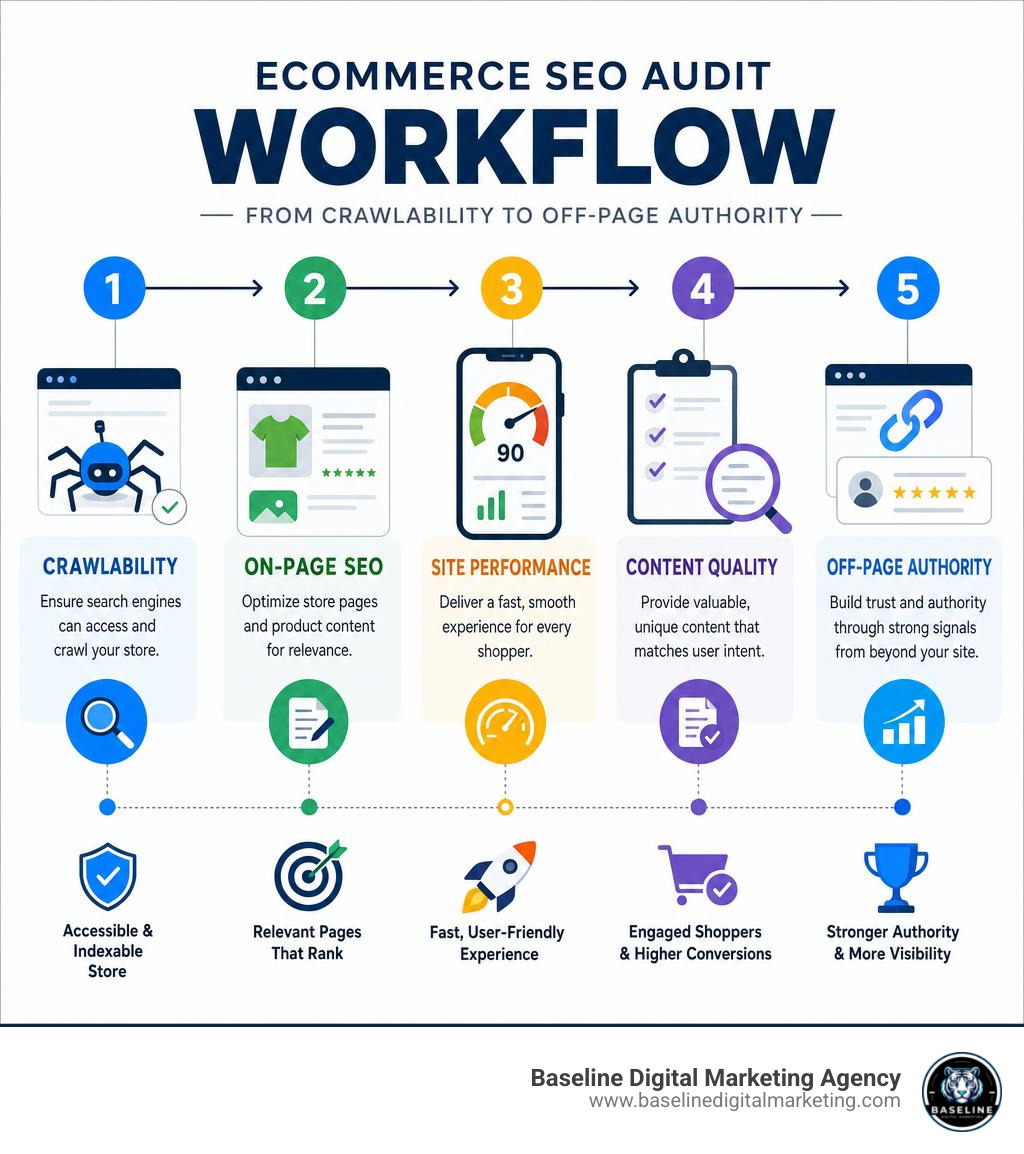
An ecommerce SEO audit is a full review of your online store’s ability to be found, crawled, and ranked by search engines like Google.
Quick answer — what does an ecommerce SEO audit cover?
| Audit Area | What It Checks |
|---|---|
| Technical SEO | Crawlability, indexation, sitemaps, robots.txt |
| On-Page SEO | Product titles, descriptions, schema, image alt text |
| Site Performance | Core Web Vitals, page speed, mobile usability |
| Content Quality | Duplicate content, thin pages, keyword alignment |
| Off-Page Authority | Backlinks, reviews, E-E-A-T signals |
Organic search delivers 43% of all ecommerce traffic and drives 44.6% of revenue for online stores. Yet most small ecommerce sites are quietly leaking that traffic through fixable technical problems they don’t even know exist.
Here’s what makes that painful: less than 1% of searchers ever click to page two of Google results. If your store isn’t ranking on page one, you’re essentially invisible.
The good news? These problems are fixable — once you know where to look.
An ecommerce SEO audit gives you a clear picture of what’s broken, what’s underperforming, and exactly what to fix first. Think of it as a routine check-up for your store. You don’t wait until sales collapse to find out something is wrong.
I’m Carlos Alvarez, founder of Baseline Digital Marketing Agency, and I’ve helped businesses diagnose and fix the exact SEO gaps that an ecommerce SEO audit uncovers — turning stalled organic traffic into measurable revenue growth. In this guide, I’ll walk you through every phase of the audit process so you can take action with confidence.
Why Your Store Needs a Regular Ecommerce SEO Audit
If you are running an online store in May 2026, you already know that the digital marketplace is noisier than ever. With global retail ecommerce scaling rapidly, relying solely on paid ads is a fast track to burned budgets and shrinking margins. Organic search remains the most sustainable, high-ROI channel available, generating 23.6% of all orders across the web.
When you optimize your search presence, the payoff is massive: the median ROI of SEO measures is 748%, and specifically in ecommerce, the ROI of SEO measures sits at a highly profitable 317%.
However, an ecommerce site is a living, breathing machine. Every time you add a new product, delete an out-of-stock item, tweak a category name, or run a seasonal promotion, you risk breaking something under the hood. Without a proactive strategy, small technical glitches begin to accumulate, slowly choking off your organic traffic.
Conducting a regular Your 2026 Ecommerce SEO Audit Checklist [+ Free Workbook] ensures that search engines can easily find, crawl, and list your products, safeguarding your long-term organic revenue.
How an Ecommerce SEO Audit Differs from Standard Audits
A standard website audit is like inspecting a small sedan; an ecommerce SEO audit is like inspecting a commercial airplane.
While a standard audit focuses primarily on simple blog posts, service pages, and basic site health, an ecommerce audit must deal with scale, dynamic inventory, and highly complex site structures.
[Standard Audit]   --> Focuses on: Blog Posts, Service Pages, Basic Contact Info
[Ecommerce Audit]  --> Focuses on: Faceted Navigation, Product Variants, Cart/Checkout Pages, Canonicalization
Online shops have unique technical challenges that standard sites never encounter:
- Massive Product Catalogs: Managing thousands of product and category pages that change daily.
- Dynamic URLs & Faceted Navigation: Filters for sizes, colors, and prices that can generate millions of duplicate URLs.
- Duplicate Content: A staggering 83% of ecommerce shops suffer from duplicate content issues, often caused by identical manufacturer descriptions or unconfigured product variants.
- Broken Links: Over 62.4% of ecommerce shops have broken links, which waste crawl budget and frustrate shoppers.
To navigate these complexities, your audit must focus specifically on Ecommerce components rather than generic web checklists.
The Direct Revenue Impact of Technical Fixes
Many store owners assume they need to write hundreds of new blog posts to rank better. In reality, fixing the backend infrastructure of your store can drive immediate, explosive revenue growth.
Consider these industry realities:
- Immediate Revenue Lifts: Technical fixes alone have been shown to yield up to 118% revenue increases without changing a single piece of creative copy.
- Compounding Growth: One ecommerce store experienced a massive 700% growth in organic traffic over 12 months simply by cleaning up its technical SEO and crawlability issues.
- The Power of Small Wins: Another mid-sized shop achieved a 312% traffic increase over 12 months by correcting just four critical technical errors.
When search engines don’t have to fight their way through broken redirects, duplicate pages, or slow-loading resources, they index your products faster, rank them higher, and send highly qualified buyers directly to your checkout page. You can read more about mapping out these high-impact opportunities in this detailed Ecommerce SEO Audit Guide for 2026 (Step-by-Step) | Vizup.
Phase 1: Technical SEO, Crawlability, and Indexing
Before you spend a single minute writing product copy, you must answer one critical question: Can Google actually find and read my pages? If search crawlers are blocked or confused, your on-page optimization won’t matter.
To ensure your store is visible across all search engines, a comprehensive technical review is the first step of our Search Everywhere Optimization process.
Essential Tools for Your Ecommerce SEO Audit
To audit your store effectively, you need the right diagnostic toolkit. We recommend setting up and utilizing the following tools:
- Google Search Console (GSC): Your direct line of communication with Google. Use it to submit sitemaps, inspect specific URLs, and check the “Pages” report to see exactly which products are indexed and which are being excluded.
- Google Analytics 4 (GA4): Critical for tracking user behavior, organic landing pages, and conversion rates.
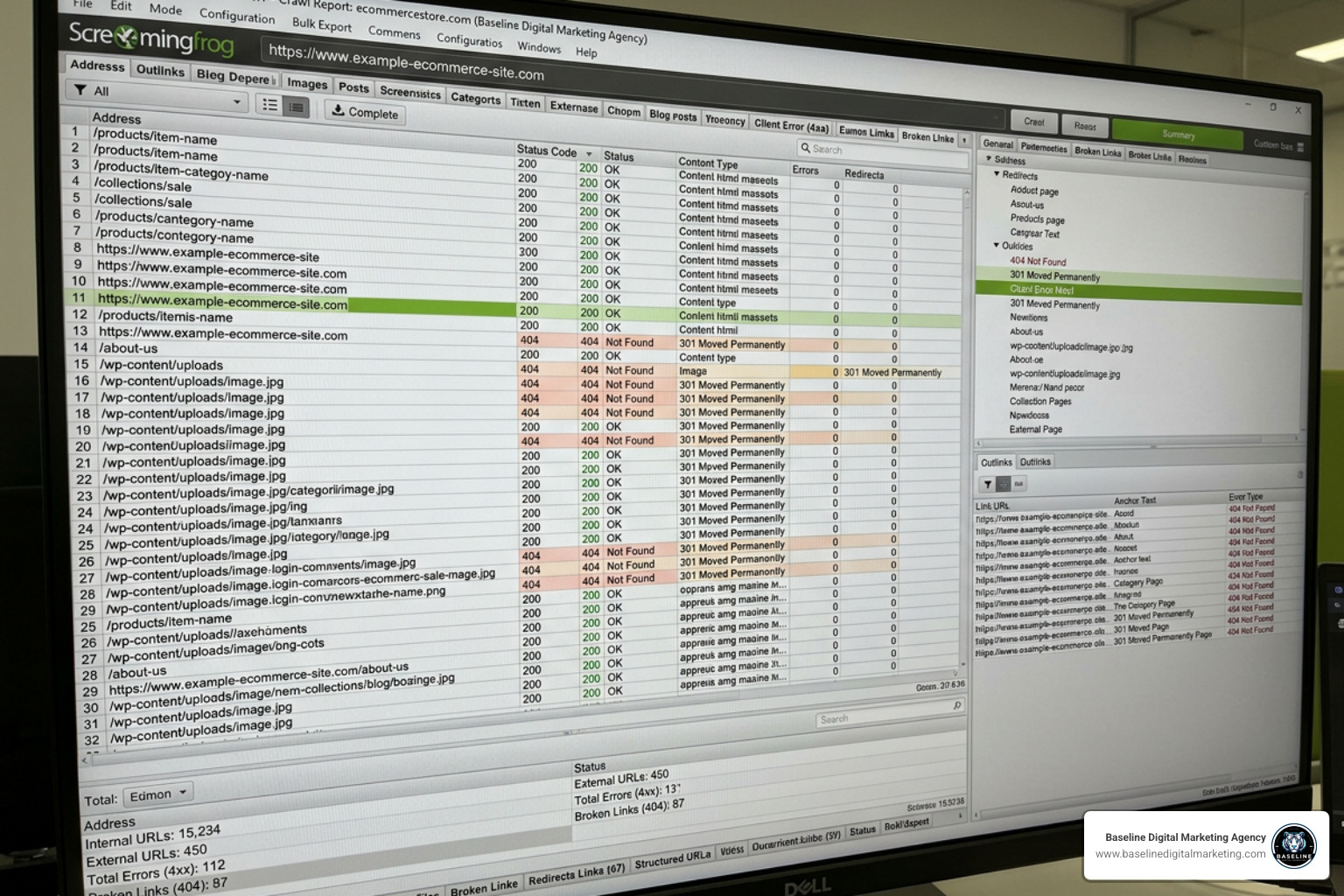
- Screaming Frog SEO Spider: A desktop crawler that mimics search engine bots. It is indispensable for identifying redirect chains, 404 errors, missing metadata, and orphan pages across thousands of products.
- Ahrefs or Semrush: Perfect for analyzing keyword performance, identifying search intent gaps, and auditing your backlink profile.
Robots.txt, XML Sitemaps, and Crawl Budget
Search engines allocate a limited amount of time and resources to crawl your site—this is known as your crawl budget. If your store has thousands of low-value, auto-generated pages, Google may waste its budget there and miss your core product pages entirely.
Robots.txt Configuration
Your robots.txt file acts as a gatekeeper. For ecommerce sites, it should block non-essential, non-revenue-generating paths like:
/cartor/checkout/adminor account login pages- Internal search result pages (e.g.,
*?q=*or/search/)
Ensure you do not accidentally block critical category pages (for example, a Shopify store accidentally blocking /collections/ can cause organic traffic to plummet overnight).
XML Sitemap Health
Your sitemap should be a clean, curated list of your most important, indexable pages.
- Status Code 200 Only: Every URL in your sitemap must return an HTTP 200 status code. Never include redirects (301), broken pages (404), or pages with
noindextags. - No URL Parameters: Ensure your XML sitemap contains only clean, canonical URLs.
- Auto-Update Rules: Configure your sitemap to update automatically when products are added or permanently removed.
- Split Large Sitemaps: If your store contains more than 50,000 URLs, split your sitemaps into smaller, logically organized files (e.g.,
sitemap-products.xml,sitemap-categories.xml) to prevent processing errors.
For a deeper dive into optimizing these foundational technical files, explore the Ecommerce SEO Audit: Essential Guide and Checklist – Macrometa.
Faceted Navigation and URL Parameters
Faceted navigation—allowing users to filter products by size, color, brand, or price—is fantastic for user experience, but it is a major source of technical SEO issues.
When filters are applied, they often generate dynamic URLs like yourstore.com/shoes?color=red&size=10&price=under-50. If left unchecked, search engines will attempt to crawl every single variation, wasting your crawl budget and creating massive duplicate content issues. In fact, 53% of ecommerce shops are missing canonical tags on an average of 40% of their pages.
To manage this, you must choose the right tool for the job:
| Method | When to Use It | How It Works | Impact on Crawl Budget |
|---|---|---|---|
| Canonical Tags | Use when pages are highly similar (e.g., product variants like different sizes of the same shirt). | Tells Google: “This variant page is just a copy; pass all ranking credit to the main product URL.” | Does NOT save crawl budget. Google still crawls the page to read the canonical tag. |
| Robots.txt Disallow | Use for infinite filter combinations (e.g., price ranges, sorting orders, multi-select filters). | Blocks search bots from accessing parameter-heavy URLs entirely. | Saves crawl budget. Bots do not waste time crawling blocked parameter paths. |
| Noindex Tag | Use when you want a page to be crawlable (to pass link equity) but never show up in search results. | Tells Google: “You can crawl this, but do not show it to searchers.” | Does NOT save crawl budget. Google must crawl the page to see the noindex tag. |
Always ensure that every product page features a self-referencing canonical tag pointing back to its primary, clean URL to prevent indexing mismatches.
Phase 2: On-Page Optimization and Product Page Architecture
Once you have established a healthy technical foundation, the next step is optimizing how your pages are structured and formatted.
[Homepage]
    [Category Pages (Collections)]
  [Sub-Category Pages]
  [Individual Product Pages]
A healthy ecommerce site structure should be shallow, simple, and organized. As a golden rule, every strategically important page should be reachable within 3 clicks from the homepage. This makes it incredibly easy for both users and search bots to navigate your catalog. To learn more about structuring your categories based on real buyer behavior, check out our Market Research & Analysis services.
Product and Category Page Elements
Every category and product page must be optimized to target commercial search queries while remaining highly engaging for human shoppers.
- Meta Titles and Descriptions: Align your titles with high commercial intent search queries. Instead of a generic “Red Leather Shoes,” use “Men’s Red Leather Dress Shoes | Free Shipping | BrandName.” Keep titles under 60 characters and descriptions under 160 characters.
- Unique Product Descriptions: Avoid copying the manufacturer’s default description verbatim. Write at least 300 words of original copy for every product. Highlight key benefits, materials, sizing, and use cases to stand out from the 83% of stores struggling with duplicate content.
- Image Alt Text: Optimize your image alt text with descriptive, natural keywords (e.g., use
alt="waterproof blue hiking boots with steel eyelets"instead ofalt="IMG_29841"). This improves accessibility and helps your products rank in Google Images.
For an extensive, step-by-step review of these critical page elements, refer to the Ecommerce SEO audit: 18 steps checklist to do it right – Siteimprove.
Structured Data and Schema Markup
If you want your listings to stand out on search engine results pages (SERPs), you need structured data. Schema markup (specifically in JSON-LD format) acts as a direct translator, telling search engines exactly what your product data means.
By implementing Product Schema, you can display rich snippets directly in search results, showing searchers:
- Price and Currency: (e.g.,
$49.99) - Availability: (e.g., “In Stock”)
- Ratings and Reviews: (e.g., 4.8 out of 5 stars based on 124 reviews)
Rich snippets dramatically increase your click-through rates (CTR) because they give buyers immediate, trustworthy answers before they even click on your link.
Phase 3: Performance, Mobile Usability, and Off-Page Authority
Your store might have the best products and perfect on-page SEO, but if it takes too long to load on a mobile device, shoppers will leave before they ever see your checkout page.

Ensuring a fast, seamless mobile experience is a core part of our modern Website Development approach.
Core Web Vitals and Site Speed
Page speed is not just a minor ranking factor; it is a critical driver of conversions. Deloitte research shows that a mere 0.1-second improvement in mobile site speed leads to an 8.4% increase in conversions for retail sites. Furthermore, page speed improvements alone can increase conversions by 7% for every single second reduced.
Yet, the average online shop scores a disappointing 67 out of 100 on the Lighthouse Performance Score.
When conducting your audit, use Google PageSpeed Insights to evaluate these three Core Web Vitals:
- Largest Contentful Paint (LCP): Measures loading performance. Your main product image or banner should load within 2.5 seconds of a user landing on the page.
- Cumulative Layout Shift (CLS): Measures visual stability. Content should not shift unexpectedly as elements load (target score: 0.1 or less).
- Interaction to Next Paint (INP): Measures page responsiveness when users tap or click (target score: 200 milliseconds or less).
The most common culprit behind slow ecommerce pages? High-resolution, uncompressed product images. Ensure your images are compressed, saved in next-gen formats (like WebP or AVIF), and lazy-loaded so they don’t block the initial page load.
Off-Page Signals, E-E-A-T, and AI Search Readiness
While technical and on-page SEO make your site crawlable and user-friendly, off-page authority tells search engines that your brand is trustworthy.
- Backlinks: Focus on building high-quality, relevant links from industry blogs, product review sites, and digital publications. Monitor your backlink profile to identify and disavow toxic links.
- E-E-A-T (Experience, Expertise, Authoritativeness, Trustworthiness): Google prioritizes brands that display real-world credibility. Highlight customer reviews, display clear return policies, secure your site with HTTPS, and include detailed “About Us” and contact pages.
- AI Search Readiness: In May 2026, product discovery is no longer limited to standard search results. Customers are actively searching for products using AI engines like ChatGPT, Google AI Overviews, and Perplexity.
To ensure your products are cited by AI search tools, you must optimize for AI-driven discovery. This includes keeping your structured data flawless, allowing AI bots (like GPTBot) to crawl your informational pages, and maintaining a strong presence on reputable third-party review platforms. You can check your store’s readiness using the Ecommerce SEO Audit Checklist 2026 (AI-Ready) | Passionfruit.
Frequently Asked Questions about Ecommerce SEO Audits
How often should I audit my online store?
We recommend conducting a comprehensive ecommerce SEO audit at least twice a year. However, if you have a highly dynamic inventory, frequently add new product lines, or make regular updates to your store’s code, quarterly audits are highly beneficial. You should also run a targeted technical audit immediately following any platform migration or major theme redesign to catch errors before they impact your traffic.
What is a healthy indexation rate for ecommerce sites?
For a healthy ecommerce site, you should aim to have at least 70% of your submitted URLs indexed in Google Search Console. If your indexation rate drops below 50%, it is a strong warning sign of serious technical issues, such as crawl budget waste, extensive duplicate content, unconfigured canonical tags, or accidental index blocks in your robots.txt file.
Can duplicate content from product variants hurt my rankings?
Yes. If you sell a product in ten different colors and each color has its own unique URL with identical product descriptions, search engines will struggle to determine which page is the primary version. This leads to keyword self-cannibalization, where your own pages compete against one another, lowering your overall rankings. Always use canonical tags to point variant URLs back to the primary product page.
Conclusion
An ecommerce SEO audit is not a one-time task to check off your list; it is a strategic roadmap to unlocking hidden revenue. By systematically identifying and resolving technical crawl errors, optimizing your product page architecture, and improving mobile load times, you can turn flat organic traffic into a powerful engine for sales growth.
However, we know that managing a complex online store leaves little time for digging through server logs, configuring redirect chains, and writing schema markup.
At Baseline Digital Marketing Agency, we develop custom digital strategies, deliver cutting-edge SEO, build high-performance websites, and provide branding services designed to scale your business. Let us handle the technical heavy lifting so you can focus on running your business. Partner with us for professional SEO services today and let’s turn your organic search channel into a high-converting asset.