Why a Technical SEO Audit is Your Foundation for Organic Growth
When most business owners think about SEO, they immediately picture keywords, blog posts, and backlinks. While those elements are incredibly important, they are only the upper floors of the building. Technical SEO is the concrete foundation. If your foundation is cracked, the entire structure will collapse, no matter how beautiful the design or how well-written the content.
Think of it this way: search engine web crawlers (like Googlebot) are automated software programs. Before Google can evaluate your content for quality, relevance, or authority, it must first be able to access your pages. If a technical issue prevents Googlebot from crawling your site, your content is essentially invisible.
This technical foundation is even more critical in the modern search landscape. As of June 2026, 40% of searches now happen in AI engines and generative search interfaces. These AI engines rely on clean, structured, and highly accessible technical infrastructure to extract answers. If your site has technical roadblocks, AI search agents will simply bypass your brand and pull citations from your competitors.
Furthermore, ignoring your site’s technical health is costly. On average, websites without ongoing technical SEO monitoring experience a 12% organic traffic decline per quarter. To protect your traffic, you must understand how search engines interact with your site. If you want a complete look at how technical health fits into a broader marketing strategy, check out our A-Z Guide to SEO Services.
How to Perform a Detailed SEO Audit of Crawlability and Indexation
The first phase of any detailed seo audit is analyzing crawlability and indexation. Crawlability refers to the search engine’s ability to discover and scan your pages. Indexation refers to whether Google actually keeps those pages in its web index to display in search results.
To systematically check your crawlability, you must start with three key elements:
- The robots.txt File: This is a simple text file located at the root of your domain (e.g.,
yourdomain.com/robots.txt). It tells search engine crawlers which pages or directories they can and cannot request. During your audit, verify that your robots.txt returns an HTTP 200 status code, is under the 500KB file size limit, and does not contain a globalDisallow: /rule that accidentally blocks all search engines from your site. - XML Sitemaps: Your sitemap is a roadmap that guides crawlers to your most important pages. A healthy sitemap should only contain canonical, indexable, 200-status URLs. It should never include redirecting URLs, 404 error pages, or pages blocked by robots.txt. Ensure your sitemap is submitted in Google Search Console (GSC) and keeps to the limits of 50,000 URLs and 50MB uncompressed per file.
- Crawl Budget: Search engines do not have infinite resources. They assign a “crawl budget” to your site, which is the number of pages Googlebot will crawl in a given timeframe. If your site is cluttered with duplicate content, broken links, or low-quality parameter URLs, Googlebot will waste its budget on junk and miss your high-value pages.
Sites with 10,000+ pages typically lose up to 30% of their crawl coverage to duplicate, low-quality, or blocked URLs. To prevent this waste and ensure your site is completely optimized, you must systematically audit your crawl paths, parameters, and sitemaps to guide your optimization process step-by-step.
Diagnosing Indexation Issues in a Detailed SEO Audit
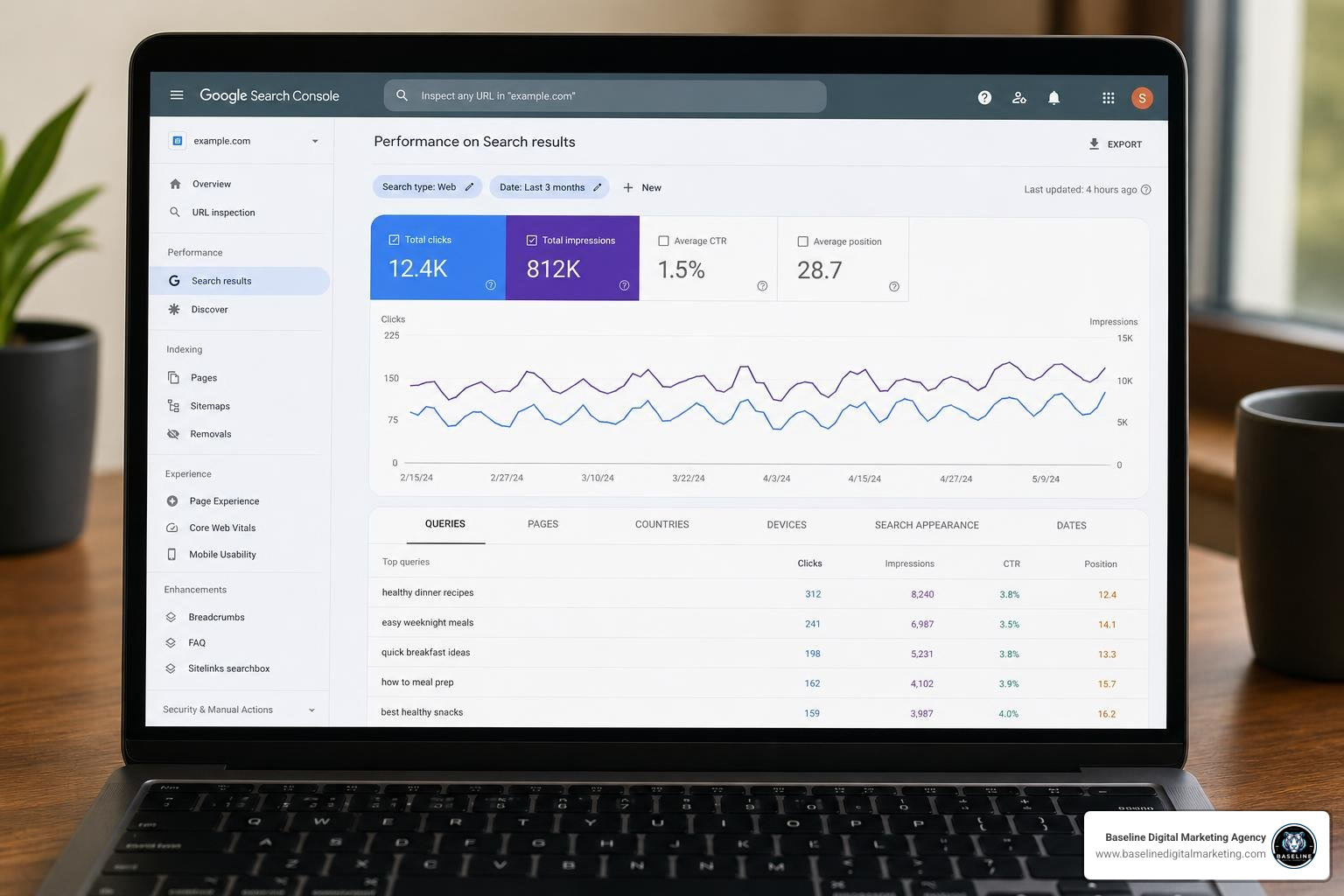
Once you have verified that Googlebot can crawl your website, you need to ensure that it is actually indexing your pages. The absolute best tool for diagnosing indexation issues is the Google Search Console Pages Report.
Inside GSC, you will see a breakdown of indexed vs. non-indexed pages. While it is completely normal to have some non-indexed pages (such as feed URLs or administrative paths), you must look closely at the reasons why your core pages are excluded.
Two major areas to audit during this step are:
- Canonical Tags: A canonical tag tells search engines which version of a URL is the “master” copy. Every indexable page on your website should have a self-referencing, absolute canonical tag in the HTML
. If your canonical tags are missing, broken, or pointing to staging environments, search engines will get confused and split your page authority. - Noindex Directives: Sometimes, developers accidentally leave a
tag on live pages after finishing a site migration or redesign. A quick crawl of your site will reveal if any high-value pages are being blocked from indexation by an accidental noindex tag.
Fixing these basic indexation issues is incredibly rewarding. Resolving duplicate content and utilizing structured data to earn rich results can dramatically improve how your site looks in search. In fact, rich results increase organic CTR by 20–30% on average. To check your site’s overall accessibility and see if it is ready for modern AI search engines, you can use tools like SEO Site Checkup: Reclaim Lost Traffic with LLM-Ready SEO … to spot quick-fix errors.
Optimizing Crawl Budget for Large-Scale Sites
For larger websites, particularly e-commerce platforms with thousands of product variations, crawl budget optimization is a major ranking factor. The most common culprit of crawl budget waste is parameter proliferation (often caused by faceted navigation). When users filter products by size, color, or price, the website generates thousands of unique URLs that display nearly identical content.
If Googlebot gets stuck crawling these infinite parameter loops, it will stop crawling your actual product pages. To prevent this:
- Define an allowlist of indexable facets and block uncontrolled filter parameters using robots.txt or Google’s URL parameter tools.
- Watch out for crawl traps, such as calendar archives or dynamically generated search results pages, which create an infinite number of pages for Googlebot to crawl.
- Fix long redirect chains. Every redirect hop costs crawl budget and slows down the crawler. If Googlebot has to follow more than two hops to reach a page, it may stop following the path entirely.
Auditing Site Architecture, URL Structure, and Internal Linking
Site architecture is the way your website’s pages are organized and linked together. A well-structured site makes it incredibly easy for users and search engines to find what they are looking for. The golden rule of site architecture is the three clicks rule: a well-structured site keeps all commercially important pages within three clicks of the homepage.

When pages are buried four, five, or six clicks deep, they receive very little “link equity” (or SEO authority) and are crawled much less frequently by Googlebot. During your internal linking audit, you should also look for orphan pages—pages that have zero internal links pointing to them. A systematic internal linking audit typically uncovers 40-60% of pages with zero internal links.
If a page has no internal links, search engines cannot discover it through natural crawling, and it will struggle to rank. To learn how to find and reclaim these lost ranking opportunities, read our complete guide on performing an Internal Linking Audit: How to Find Hidden Ranking Opportunities.
Eliminating Redirect Chains and Orphan Pages
An essential part of site architecture cleanup is eliminating redirect chains. Over years of site updates, migrations, and content refreshes, it is common for redirects to pile up. For example, Page A redirects to Page B, which redirects to Page C, which finally redirects to Page D.
Every single redirect hop costs a small portion of your link equity (roughly 5-10% of “link juice” is lost per hop) and slows down your page load speed. You should always resolve redirect chains so that Page A points directly to Page D. If you run an online store, cleaning up these crawl paths is vital for keeping your product pages visible. Check out The Ultimate Ecommerce SEO Audit Checklist to Boost Sales for specialized tips on auditing large online catalogs.
Core Web Vitals, Mobile Usability, and JavaScript Rendering
In 2026, user experience is search engine experience. Google wants to send its users to websites that load quickly, respond instantly, and work beautifully on mobile devices. This is why Core Web Vitals and mobile usability are direct ranking signals.
Before diving into fixes, it is crucial to understand the difference between field data and lab data:
| Metric Type | What It Measures | Source | Why It Matters |
|---|---|---|---|
| Field Data | Real-world user experiences over the last 28 days | Chrome User Experience Report (CrUX) | This is what Google uses to determine your rankings. |
| Lab Data | A simulated page load under controlled conditions | Lighthouse / PageSpeed Insights | Excellent for debugging, but does not directly affect rankings. |
Ensuring your site passes these performance benchmarks has a direct impact on your bottom line. Pages in the top LCP quartile (under 2.5 seconds) see a 24% higher organic CTR than pages failing Core Web Vitals thresholds. If your mobile performance is dragging down your business, read our guide on why you shouldn’t Don’t Let Your Mobile Rankings Go South.
Fixing Core Web Vitals: LCP, CLS, and INP
To pass Google’s performance thresholds, you must optimize three core metrics:
- Largest Contentful Paint (LCP): This measures how long it takes for the main content of a page to load. An LCP under 2.5 seconds is considered “Good.” The most common cause of a poor LCP score is an unoptimized hero image. To fix this, compress your images to next-gen formats (WebP or AVIF), use responsive image sizes (
srcset), and preload your LCP image in the document head using. - Cumulative Layout Shift (CLS): This measures visual stability. Have you ever tried to click a link on a mobile page, only for the page to shift suddenly and cause you to click an ad instead? That is a CLS issue. A CLS score under 0.1 is considered “Good.” You can prevent this by always defining explicit width and height dimensions on images and reserving space for dynamic elements (like banner ads) in your CSS.
- Interaction to Next Paint (INP): Replaced First Input Delay (FID), INP measures overall page responsiveness by tracking the latency of all user interactions (like clicks or keypresses) on a page. An INP under 200ms is considered “Good.” To fix INP issues, defer non-critical JavaScript, break up long tasks, and minimize third-party scripts.
Auditing JavaScript Rendering and Mobile Parity
Since Google now uses mobile-first indexing for all websites, Googlebot crawls and indexes the mobile version of your site first. This means your mobile and desktop sites must have complete parity. They must feature the exact same content, structured data, and navigation links.
Additionally, many modern websites rely heavily on JavaScript frameworks (like React, Angular, or Vue) to render content. This is where JavaScript rendering audits come in. When Googlebot visits a JavaScript-heavy site, it performs a two-pass indexing process:
- First Pass: Googlebot crawls the raw HTML returned by the server. If your content is not present in the raw HTML and requires JavaScript to render, Googlebot will not see it during this pass.
- Second Pass: Once rendering resources become available, Googlebot renders the page using a headless browser and indexes the rendered content. This second pass can take days or even weeks.
If your critical content or internal links are hidden behind client-side JavaScript rendering, they may not be indexed for a long time. Always verify that your critical text, structured data, and internal links are visible in the rendered HTML output.
On-Page Technical Signals, Structured Data, and Security
The next phase of your detailed seo audit moves into on-page technical signals, structured data, and security. While content quality is subjective, on-page technical signals are objective, highly measurable, and easy to fix.
During this stage of the audit, you should check:
- Title Tags: Keep titles between 50-60 characters (or under 580 pixels) to prevent them from being truncated in search results. Every page must have a unique title tag that accurately reflects the page’s content.
- Meta Descriptions: While meta descriptions do not directly affect rankings, they act as ad copy for your organic listings. Keep them between 110-160 characters to optimize your click-through rates.
- Header Structure: Use a logical H1-H6 hierarchy. Every page should have exactly one H1 tag that matches the primary user intent.
- Image Optimization: Ensure all images have descriptive alt text that includes relevant keywords naturally. Alt text helps search engines understand the image content and is vital for web accessibility.
Auditing On-Page Elements and Schema Markup
Structured data (or schema markup) is a standardized format for providing search engines with explicit clues about the meaning of a page. Despite its massive benefits for earning rich results, only 17% of the top 10 million websites implement any form of schema markup.

By auditing and implementing schema markup (such as Organization, Article, Product, or BreadcrumbList schema), you give your business a massive competitive advantage. Always validate your schema using Google’s Rich Results Test to ensure it is eligible for SERP enhancements.
Security and Server Configuration Checks
Security is a non-negotiable ranking factor. Google requires all sites to use HTTPS. However, many sites suffer from mixed content issues, which occur when a secure HTTPS page loads resources (like images, scripts, or stylesheets) over an insecure HTTP connection.
Mixed content warnings and expired SSL certificates cause Chrome to flag your site with security warnings. These warnings scare away visitors and can suppress your organic click-through rates by up to 45%.
To prevent this:
- Ensure your SSL certificate is valid and configured to auto-renew.
- Implement a 301 redirect rule at the server level to force all HTTP traffic to the secure HTTPS version.
- Configure a Strict-Transport-Security (HSTS) header with a minimum
max-ageof 31,536,000 seconds to force browsers to always load your site securely.
Maximizing Quick Wins and Prioritizing Your Action Plan
After completing your audit, you will likely have a long list of issues to fix. The secret to a successful SEO campaign is knowing how to find quick wins and prioritize your resources.
Google Search Console is a goldmine for quick wins. Look for CTR opportunities by filtering your performance report for keywords that have high impressions but low click-through rates. Often, a simple tweak to a title tag or meta description can double your clicks for a keyword you already rank for.
Additionally, check your search appearance report to see which rich results are driving traffic. If you have pages ranking on page one that are eligible for FAQ or Product schema but do not have it implemented, adding that markup is a massive, high-impact quick win.
Prioritizing Fixes After a Detailed SEO Audit
To prevent overwhelm, we recommend using a simple three-tier prioritization framework to organize your audit fixes:
- Tier 1: Revenue-Blocking Issues (Fix Immediately): These are critical problems that stop search engines from crawling or indexing your site. Examples include global robots.txt disallow rules, accidental site-wide noindex tags, major server errors (5xx), and expired SSL certificates.
- Tier 2: Authority Leakage (Fix Within 30 Days): These issues bleed your site’s authority and slow down crawlers. Examples include redirect chains, orphan pages, broken internal links (404s), and missing canonical tags on key pages.
- Tier 3: Opportunity Capture (Fix Within 90 Days): These are optimization opportunities that will boost your rankings once your foundation is clean. Examples include fixing Core Web Vitals, adding structured data, and optimizing title tags for CTR.
By focusing on these three tiers, you can systematically turn your audit findings into immediate, actionable growth without feeling overwhelmed by the sheer volume of technical recommendations.
Frequently Asked Questions about SEO Audits
How often should a technical SEO audit be performed?
We recommend conducting a deep-dive detailed seo audit at least once a year. However, you should perform mini-audits quarterly, and immediately after any major site changes, such as a CMS migration, a site redesign, or a major code deployment. If your development team is pushing new code weekly, you should set up automated monitoring to catch regressions in real-time.
What is the difference between a technical SEO audit and a standard SEO audit?
A technical SEO audit focuses strictly on your website’s underlying infrastructure—crawlability, indexability, speed, schema, and security. A standard (or comprehensive) SEO audit includes all of those technical checks, but also evaluates your content quality, keyword strategy, backlink profile, and competitor landscape to build a complete digital marketing roadmap.
Can a technical SEO audit help with AI search visibility?
Yes, absolutely. AI search engines and large language models (LLMs) rely heavily on clean site architecture, fast loading times, and valid structured data to crawl, parse, and understand your content. If your technical SEO is broken, AI engines cannot read your site, meaning you will miss out on valuable AI-generated search citations.
Conclusion
A detailed seo audit is not a one-time chore; it is an ongoing commitment to your website’s health. In a search landscape that is constantly evolving with AI engines and core algorithm updates, keeping your technical foundation clean is the only way to protect and grow your organic traffic.
If you are ready to stop guessing and start ranking, we are here to help. At Baseline Digital Marketing Agency, we develop custom digital strategies, deliver advanced SEO, build high-performance websites, and provide branding services to help businesses scale their online presence.
Let us handle the technical heavy lifting so you can focus on running your business. To explore our full suite of digital growth solutions, check out our A-Z Guide to SEO Services and let’s start building your foundation for organic success today.