
Your Mobile Site Is Your Site — Here’s What That Means for SEO
Mobile site SEO is the practice of optimizing your website so it performs well on smartphones and tablets — and ranks higher in search results on all devices.
Quick answer: What is mobile site SEO?
| Question | Answer |
|---|---|
| What is it? | Optimizing your site for mobile devices to improve search rankings and user experience |
| Why does it matter? | Google ranks all pages — including desktop — based on the mobile version of your site |
| Who is affected? | Every website owner, especially small businesses targeting local customers |
| What does Google look for? | Fast load times, responsive design, content parity, and mobile-friendly navigation |
| Where do I start? | Responsive design + Core Web Vitals + content that works on a small screen |
Here is the reality: over 60% of all web traffic now comes from mobile devices. When someone searches for your business — whether that is your hours, your services, or your location — they are almost certainly doing it on a phone.
And Google knows this.
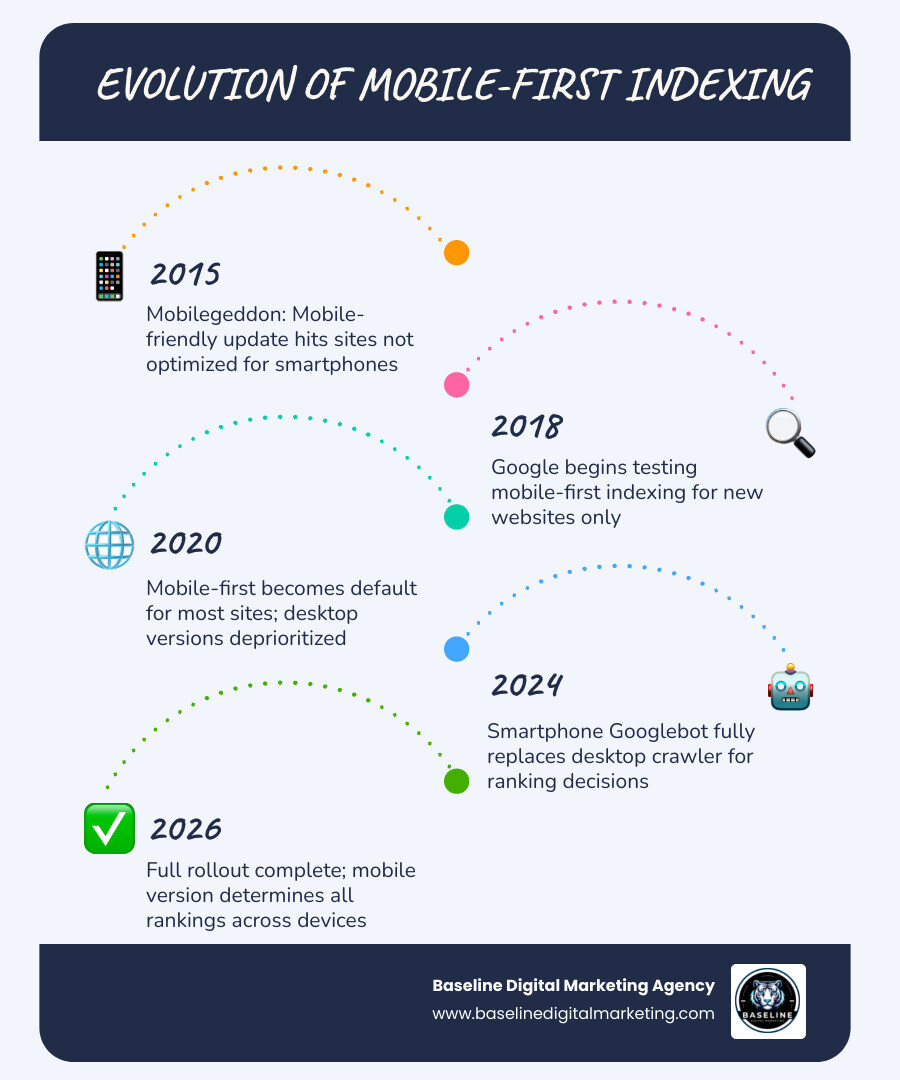
Since completing its mobile-first indexing rollout, Google no longer evaluates your desktop site first. It sends a smartphone crawler to your site, reads what that version shows, and uses that to decide where you rank — for both mobile and desktop searches.
That means if your mobile site is slow, hard to read, or missing content that lives on your desktop version, your rankings will suffer. Everywhere.
If your mobile experience feels broken or slow, your search rankings will reflect that — no matter how good your desktop site looks.
I’m Carlos Alvarez, founder and CEO of Baseline Digital Marketing, and my experience leading growth strategy across digital marketing — including mobile site SEO — has shown me how often small businesses lose rankings simply because their mobile experience is an afterthought. In this guide, I’ll walk you through exactly what you need to know to fix that.
Understanding Mobile-First Indexing and Why It Matters
In the early days of the web, mobile sites were often “lite” versions of the main desktop site. We used to think of mobile as a secondary experience. Those days are officially over. As of May 2026, Google has completed its long transition to a mobile-first world.
Smartphone Googlebot and Crawling Mechanics
When Google explores your website, it uses a specialized tool called the “Smartphone Googlebot.” This is a headless browser that renders your site exactly like a mid-tier Android device would. It doesn’t care how beautiful your site looks on a 27-inch monitor; it cares about how your code behaves on a 6-inch screen.
Indexing vs. Ranking
It is a common misconception that there are two different indexes—one for mobile and one for desktop. In reality, there is only one. Google uses the mobile version of your content to decide what should be in that index. If a piece of information exists on your desktop site but is hidden or removed on your mobile site, Google may effectively “forget” it exists. This is why Mobile-first Indexing Best Practices emphasize that your mobile site must be the primary source of truth.
Content Parity and Crawl Budget
Content parity is the “Golden Rule” of mobile site SEO. It means that your mobile site should have the same high-quality content as your desktop site. If you have 2,000 words of helpful advice on desktop but only 200 words on mobile to “save space,” you are going to lose topical authority.
Furthermore, mobile sites often require more “crawl budget” because mobile CPUs are slower at parsing complex JavaScript. If your site is too heavy, the Googlebot might stop crawling before it reaches your most important pages. At Baseline Digital Marketing, we specialize in Search Everywhere Optimization to ensure your brand’s footprint is visible across all platforms, starting with a crawlable mobile foundation.

Technical Requirements for Effective Mobile Site SEO
To win at mobile site SEO, your technical foundation must be rock-solid. You can’t just “shrink” a desktop site and hope for the best.
Responsive Design: The Industry Standard
We always recommend Responsive Web Design (RWD) for our clients. It uses a single URL and the same HTML code for all devices, using CSS media queries to “respond” to the size of the screen. This is much easier to maintain than having a separate “m.dot” site, which often leads to redirect errors and split link equity.
| Configuration | Description | SEO Impact |
|---|---|---|
| Responsive Design | One URL, one set of HTML. Layout changes via CSS. | Best. Recommended by Google for ease of crawling and maintenance. |
| Dynamic Serving | One URL, but different HTML/CSS based on device type. | Complex. Risky if user-agent detection fails or caches get mixed up. |
| Separate URLs | Different URLs (e.g., m.example.com) for mobile users. | Legacy. High maintenance; requires complex “hreflang” and “canonical” tags. |
Viewport Configuration
The viewport is the user’s visible area of a web page. Without a viewport meta tag, mobile browsers will render the page at a desktop width and then try to scale it down, making text microscopic. You must include this tag in your header:
Touch Targets and Font Legibility
Mobile users navigate with their thumbs, not a precise mouse cursor. According to Mobile-First Indexing: Best Practices + Tips for Ecommerce (2026), buttons and links should be at least 48×48 pixels to prevent “fat-finger” errors. Similarly, your base font size should be at least 16px. Anything smaller forces users to pinch-and-zoom, which is a major red flag for Google’s usability metrics. Our Website Development team prioritizes these “mobile-first” elements from the first line of code.
Optimizing Core Web Vitals for Mobile Site SEO
In 2026, speed isn’t just a luxury; it’s a ranking factor. Core Web Vitals (CWV) are the specific metrics Google uses to measure user experience on mobile.
- Largest Contentful Paint (LCP): How long does it take for the main content to appear? Aim for under 2.5 seconds.
- Interaction to Next Paint (INP): This replaced First Input Delay (FID) as the gold standard for measuring responsiveness. It tracks how quickly the page reacts when a user clicks a button or taps a link.
- Cumulative Layout Shift (CLS): Does the content “jump” around while loading? A score of less than 0.1 is required to keep users from clicking the wrong thing by accident.
To hit these targets, we use image compression and modern formats like WebP, which can reduce file sizes by up to 35% compared to JPEGs. We also implement “lazy loading” for images below the fold, so the browser only downloads them when the user scrolls down. Understanding How Analytics Can Drive Business Success allows us to track these metrics in real-time and make data-driven adjustments.
Content Strategy and UX for the Mobile Era
Mobile users are usually on the go. They aren’t looking for a novel; they are looking for an answer. This means your content strategy needs to shift.
Scannability and Hierarchy
People scan mobile screens in an “F-pattern.” To keep them engaged, use:
- Short Paragraphs: No more than 2-3 sentences.
- Clear Headings: Use a logical H1-H2-H3 hierarchy so users (and bots) understand the structure.
- Bullet Points: Great for breaking up complex information.

The “Partial Credit” Trap
A major hurdle in mobile site SEO is the “Partial Credit” problem. As noted in the research on Powerful SEO Techniques For Handling Mobile Only Content, if you hide content behind “Read More” buttons that require JavaScript to load, Google might index it but give it less weight. In 2026, the mobile DOM (Document Object Model) is the absolute source of truth. If it isn’t in the initial HTML response, you’re leaving rankings on the table.
Metadata Mirroring and Semantic Chunking
Ensure your title tags and meta descriptions are identical on both versions. On mobile, Google often uses “semantic chunking” to pull specific passages for AI answers. If your mobile content is truncated, you might miss out on being the primary source for a searcher’s query.
Voice Search and AI Overviews in Mobile Site SEO
Mobile devices are the primary home of voice search. Think about how you talk to your phone: “Where is the best pizza near me?” vs. typing “pizza Chicago.”
To capture these queries, focus on conversational keywords and long-tail phrases. Use Structured Data (JSON-LD) to tell search engines exactly what your content is—whether it’s a product, a recipe, or a local business. This increases your chances of appearing in Featured Snippets and the new “AI Overviews” that dominate the top of mobile search results. For a deeper look at this evolution, check out our A Guide for Businesses in the Digital Age.
Integrating Local SEO and Mobile Performance
If you have a physical location, mobile site SEO is your best friend. Over 76% of people who search for something nearby on their smartphone visit a related business within 24 hours.
Google Business Profile and NAP Consistency
Your Name, Address, and Phone Number (NAP) must be identical across your website and your Google Business Profile. Any discrepancy can confuse Google and hurt your local rankings.
Mobile Conversion Elements
Mobile users want to take action now. Your site should feature:
- Click-to-Call Buttons: Don’t make users copy and paste your phone number.
- Embedded Maps: Help them get directions in one tap.
- Sticky CTAs: Keep your “Book Now” or “Contact Us” button visible even as they scroll.
Frequently Asked Questions about Mobile SEO
What is the difference between mobile SEO and desktop SEO?
The primary differences lie in user intent and technical rendering. Mobile users are often looking for immediate, local solutions (intent), and Google uses a smartphone agent to crawl the site (rendering). Additionally, mobile navigation relies on touch rather than a mouse, necessitating larger buttons and simplified menus like “hamburger” icons.
How do I check if my site is mobile-friendly?
You can use several free tools:
- Google Search Console: Check the “Mobile Usability” report for errors like “text too small to read.”
- Lighthouse: Built into Chrome DevTools, this provides a detailed audit of performance and accessibility.
- PageSpeed Insights: This gives you a clear look at your Core Web Vitals scores.
Does hiding content in accordions hurt mobile rankings?
In the past, there was a “desktop-first” rule that hidden content was less important. However, in a mobile-first world, Google understands that space is limited. Content in accordions or tabs is fully indexed, provided it is in the HTML code and doesn’t require a complex user interaction (like a login or a specific JavaScript trigger) to be “seen” by the bot.
Conclusion: The Mobile-First Philosophy
At Baseline Digital Marketing Agency, we believe that mobile site SEO isn’t just a checklist—it’s a philosophy. As we move further into 2026, the lines between the digital and physical worlds continue to blur. With the rise of 5G technology and Augmented Reality (AR), mobile experiences will only become more immersive and demanding.
If your website was built for a desktop world, you are likely losing traffic and revenue every single day. Don’t let your rankings go south because of a slow or clunky mobile experience. Whether you need a technical audit, a full site redesign, or a comprehensive local strategy, our team is here to help. Explore our full range of Services to see how we can future-proof your online presence.
The future of search is in the palm of your customer’s hand. Make sure you’re there to meet them.