
Why Every Website Redesign Needs a Design System
A website redesign design system is one of the most valuable tools a business can invest in before touching a single pixel of their site.
Quick Answer: What is a website redesign design system?
| Question | Answer |
|---|---|
| What is it? | A centralized collection of reusable components, style rules, and guidelines that keep your website consistent during and after a redesign |
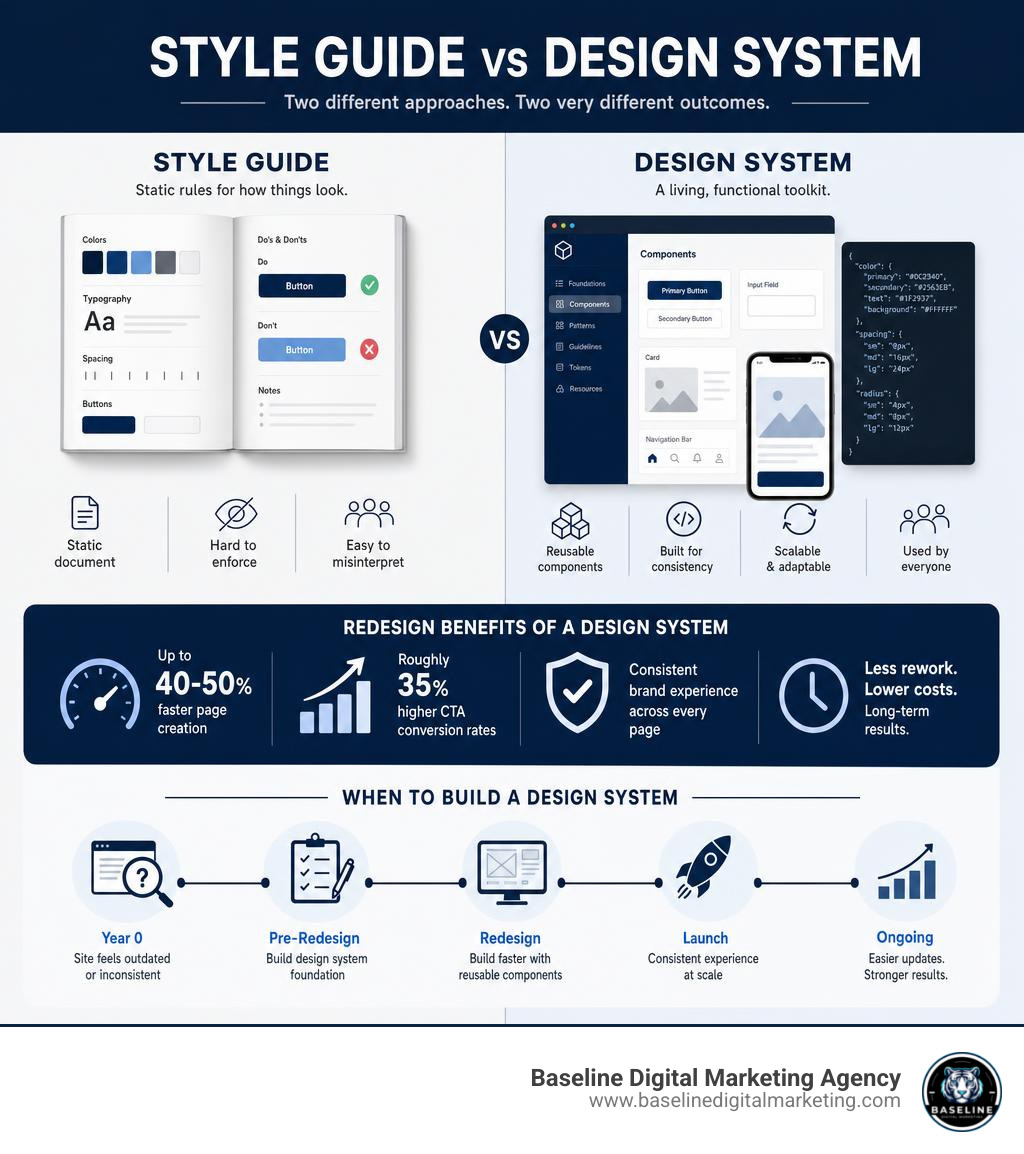
| How is it different from a style guide? | A style guide is a static document; a design system is a living, functional toolkit teams actually build from |
| Why does it matter for a redesign? | It prevents inconsistent fonts, colors, and layouts from creeping back in after launch |
| What results can it deliver? | Up to 40-50% faster page creation and roughly 35% higher CTA conversion rates |
| When do you need one? | Before you redesign — especially if your site is 2-3+ years old or feels visually fragmented |
Here’s the hard truth: most small business websites don’t fail because of bad content. They fail because of design debt — years of patched-together pages, mismatched fonts, and inconsistent buttons that quietly erode trust with every visitor.
The average website design has a lifespan of just 2-3 years. After that, the gap between what your site looks like and what users expect starts costing you rankings, leads, and sales.
A redesign without a design system is like repainting a house without fixing the foundation. You’ll end up back in the same place in 18 months.
I’m Carlos Alvarez, founder and CEO of Baseline Digital Marketing, and I’ve led growth strategies for businesses at every scale — helping teams use structured systems, including website redesign design systems, to build brands that perform consistently online. In this guide, I’ll walk you through exactly how to approach your redesign the right way, so you stop starting over and start building something that lasts.
What is a Design System vs. a Traditional Style Guide?
Many marketing teams use the terms “style guide” and “design system” interchangeably, but they are entirely different animals. Understanding this distinction is the first step toward a successful website transformation.
A traditional style guide is a static document. It usually lives as a PDF or a passive page on an intranet. It outlines your brand’s colors, typography rules, logos, brand voice guidelines, and perhaps a few rules about image usage. While style guides are fantastic for high-level brand alignment, they fall short when it comes to actual web development. They tell a developer what the brand looks like, but not how it functions interactively online.
A design system, on the other hand, is a living, breathing ecosystem. It acts as the single source of truth for both your design and development teams. It bridges the gap between creative vision and code by combining:
- Design Tokens: The absolute smallest units of your brand identity (such as specific hex codes, spacing increments, and typography scales) defined as variables.
- Component Libraries: Reusable UI elements—such as buttons, form fields, cards, navigation bars, and modals—that exist as both design files (in tools like Figma) and production-ready code.
- Pattern Guidelines: Clear rules on how and when to use these components to create consistent user flows.
To see how these two approaches stack up, let’s look at a quick comparison:
| Feature | Traditional Style Guide | Modern Design System |
|---|---|---|
| Format | Static document (PDF, slide deck) | Dynamic, interactive platform (Figma, code repository) |
| Target Audience | Marketers, copywriters, external partners | Designers, front-end developers, product managers |
| Core Content | Logos, brand colors, typography, editorial voice | Design tokens, interactive UI components, coded elements |
| Maintenance | Rarely updated; manual edits required | Continuously updated; synced directly to code repositories |
| Implementation | Guidelines must be manually recreated in code | Ready-to-use component libraries speed up development |
By establishing a design system, you ensure that your design and engineering teams are speaking the exact same language. When a designer changes a primary button style in Figma, that update can automatically sync to the developer’s codebase via design tokens. This is the difference between a static blueprint and an automated assembly line.
Why a Website Redesign Design System is Critical for Modern Brands
As we navigate the digital landscape of May 2026, user expectations are higher than ever. If your website feels clunky, inconsistent, or slow, visitors will leave in seconds. Implementing a website redesign design system is no longer a luxury reserved for tech giants; it is a critical business strategy for any brand looking to scale.

When you plan a website redesign, you aren’t just changing how your site looks—you are restructuring how your business interacts with customers online. According to industry benchmarks, the average website design lifespan is 2–5 years, with the competitive benchmark moving closer to 2–3 years due to rapid technological shifts. If you build your website without a system, it begins to decay the moment it launches. Every new landing page or marketing campaign introduces slight design variations, eventually leading to a fragmented user experience.
A unified design system halts this decay. Our clients see massive operational improvements after implementing a structured design system, including:
- 40–50% faster page creation: Marketing teams can assemble new, high-converting landing pages in hours instead of weeks because they are pulling from a pre-built library of approved components.
- ~35% CTA conversion uplift: Consistent visual cues and intuitive layouts build user trust, guiding visitors naturally toward your primary calls to action.
- 100% of pages aligned post-redesign: Eliminates the “rogue page” phenomenon where old, off-brand designs linger in forgotten corners of your domain.
To dive deeper into the strategic planning phase of a website overhaul, you can read Figma’s Website Redesign Guide, which outlines how to bridge the gap between creative exploration and structured layout design.
When is the Right Time to Redesign Your Website?
How do you know it is time to pull the trigger on a redesign? If your site is over two years old, you are likely already feeling the friction. Common signs include suffering user experience (UX) metrics, high bounce rates, drop-offs on key forms, or a brand identity that has evolved past your current digital presence.
Furthermore, rapid advancements in web standards, accessibility requirements, and mobile responsiveness mean that older sites quickly fall behind. If your marketing team is constantly complaining that they cannot build new pages without breaking existing layouts, or if your mobile experience feels like an afterthought, it is time. You can explore our previous transformations and see how we approach modern, high-performing layouts by viewing Our Web Design Work.
How a Website Redesign Design System Solves Fragmented UX
Without a centralized system, websites naturally become fragmented. Different designers and developers work on different sections of the site over time, leading to dozens of different button styles, conflicting font weights, and inconsistent spacing.
This fragmentation was a central challenge highlighted in the Devtron Case Study by Auriga IT. Devtron, a world-class AI-native Kubernetes platform with over 21,000 installations worldwide, was held back by a highly fragmented website ahead of a major industry event (KubeCon 2025). By conducting a thorough design audit and building a centralized component library in Figma and Framer based on atomic design principles, they achieved a complete experience overhaul. The result was a visually coherent, enterprise-grade digital presence that boosted page creation speed by 40-50% and yielded a ~35% conversion uplift. A design system turns a collection of isolated pages into a unified digital product.
Core Components of an Enterprise-Grade Design System
Building a robust website redesign design system requires breaking down your user interface into its most basic building blocks. We highly recommend using atomic design principles, a methodology that views web design as a hierarchical structure: atoms (basic HTML tags like buttons or inputs), molecules (groups of atoms functioning together, like a search bar), organisms (complex UI components composed of molecules, like a header navigation), templates, and finally, pages.

An enterprise-grade design system typically includes the following foundational elements:
- Typography: A clearly defined type scale specifying font families, weights, line heights, and letter-spacing for headers, body copy, and captions.
- Color Palettes: A structured color system consisting of primary brand colors, secondary accents, neutral surfaces (backgrounds and borders), and semantic statuses (success, warning, error).
- Spacing Scales: A mathematical rhythm (often based on an 8px or 4px grid) that dictates the margins and padding between elements to ensure balanced layouts.
- Corner Radius (Border Radius): A defined vocabulary of rounded corners to maintain visual discipline across cards, buttons, and inputs.
For a masterclass in visual discipline, look at the Aritzia Design System. The brand’s digital storefront reads like a print fashion editorial adapted for the web. It relies on an incredibly strict aesthetic:
- Extreme Color Restraint: It uses pure black (#000000) against white, with over 523 occurrences of black across text, borders, and backgrounds, reserving a single red (
#db1215) exclusively for validation errors. - Typography Discipline: It utilizes a single proprietary grotesque typeface (Non-Seasonal Geo) across all 9 typographic roles, from tiny 12px captions to 48px display headers.
- Hard-Cornered Geometry: It enforces a 4-step radius vocabulary that uses 0px corners almost everywhere to maintain a sharp, editorial feel, with only a single 24px pill shape reserved for specific interactive elements.
- Spacing Rhythm: An 8-step spacing scale based on multiples of four (from 0px to 192px) that ensures consistent breathing room across all 19 component entries.
Supporting Accessibility, Theming, and Multi-Platform Consistency
A modern design system must also support accessibility (WCAG compliance), theming (such as seamless light and dark modes), and multi-platform consistency. To achieve this, advanced systems transition from static styles to fully variable-powered token structures.
In the FS Design System V2 Case Study, the team leveraged tools like Leonardo to programmatically generate accessible color scales based on luminance stops. By using Figma variables for color, spacing, typography, and corner radius, they built a system capable of supporting multiple brand themes and light/dark modes seamlessly. This variable-driven approach ensures that contrast ratios (such as WCAG AA 4.5:1 and 3:1 targets) are baked directly into the tokens, making it virtually impossible for a designer or developer to accidentally create an inaccessible page.
How Design Systems Impact SEO and User Experience
At Baseline Digital Marketing Agency, we specialize in driving digital growth through a combination of search engine optimization, UX best practices, and custom development. One of the most common questions we get is: Will a website redesign help or hurt my SEO?
The answer depends entirely on how you manage user experience during the transition. Search engines like Google prioritize websites that deliver exceptional user engagement signals, fast loading speeds, and seamless mobile responsiveness. A website redesign design system acts as a protective shield for your SEO performance.
[Unified Design System]

  Clean, Reusable Code   Faster Page Speeds
   Higher Search Rankings
  Device Consistency  Lower Bounce Rates

  Intuitive Layouts  Longer Session Times
Here is exactly how a design system supports your SEO goals:
- Page Speed and Performance: By utilizing a centralized component library, your website’s codebase remains clean and lightweight. Instead of loading unique CSS and JavaScript files for every single page, the browser loads a single, optimized set of global styles. Faster load times directly improve your Core Web Vitals, which are critical ranking factors.
- Device and Mobile Consistency: A design system ensures that interactive elements behave identically whether a user is on a desktop, tablet, or mobile phone. When search engine crawlers evaluate your mobile-first indexing compliance, they look for consistent, tap-friendly layouts and legible typography.
- User Engagement Signals: When a website has fragmented UX, visitors become frustrated and bounce quickly. A design system creates a predictable, familiar environment. This keeps visitors engaged longer, increasing their dwell time and signaling to search engines that your site effectively meets user intent.
Integrating a robust design system with a comprehensive marketing plan ensures that your visual refresh does not come at the cost of your organic traffic. To learn more about aligning your digital presence with your long-term business goals, check out our Brand Strategy Services.
Real-World Examples of Successful Design Systems
To inspire your own system, let’s look at how some of the world’s most successful organizations structure their digital experiences:
- Atlassian: Known for its “better teamwork by design” philosophy, Atlassian’s system focuses on a unified design language across all product collections. They design clear, useful experiences that embrace the “beautiful mess of modern work.” Notably, they have integrated AI patterns and their Rovo AI assistant directly into their system guidelines, showing how human-AI collaboration can eliminate busywork while protecting human agency.
- USWDS (United States Web Design System): The official framework for the U.S. federal government. It is designed specifically to make it easier to build accessible, mobile-friendly government websites. The USWDS Official Site provides clear migration guidance (such as USWDS 3.0) and is used by major agencies like the Department of Veterans Affairs and NASA to ensure strict WCAG compliance and trust.
- Google Material Design: Now in its third iteration (Material 3), Google’s open-source design system is famous for its dynamic color capabilities, which automatically adapt visual themes to user preferences, and its comprehensive guidelines on motion, shape, and depth.
- British Airways: The British Airways Design System presents a highly distinct visual identity built on a high-contrast axis: Midnight Blue (
#011e41) against white, with almost nothing in between. Rather than using brand navy as a secondary accent, British Airways uses it as the structural page canvas itself. Meanwhile, their iconic Speedbird Red is held in reserve, appearing only 3% of the time for critical semantic moments like sale-price callouts, frequent-flyer badges, and validation errors. It runs on the MyliusModern typeface with a tight 4-8px radius scale. - Cursor: The Cursor Design System for the AI-first code editor takes a radically calm approach. Instead of defaulting to an obligatory dark-IDE black, Cursor’s marketing site uses a warm, editorial cream canvas (
#f7f7f4) and warm ink (#26251e). It uses its primary accent, Cursor Orange (#f54e00), incredibly sparingly—only on primary CTAs and the wordmark. It relies on a single font family (CursorGothic) alongside JetBrains Mono for code blocks, and features hairline-only depth (1px borders) with absolutely no drop shadows.
How to Audit, Build, and Maintain Your Design System
Building a website redesign design system is an organizational systems initiative, not just a UI cleanup project. It requires bridging the gaps between design, development, content, and brand teams.
A fantastic example of this collaborative approach is documented in the Core Design System Case Study. When Siemens combined its US and European digital teams, they inherited three fundamentally different ecosystems, two design languages, and three separate CMS platforms (Webiny, Contentful, and AEM) with no unified governance.
To solve this, they:
- Created a shared fact base through a joint, collaborative audit of foundational styles, components, and content models.
- Established a unified, token-driven foundation to ensure themeable, accessible interfaces across different tech stacks.
- Aligned high-impact components (such as heroes, carousels, and navigation) that touched the most critical user journeys.
- Defined a clear architecture and contribution model to support over 100 domains under a “One Siemens” digital experience.
Step-by-Step: Implementing Your Website Redesign Design System
If you are ready to build your own system during a website overhaul, follow this structured roadmap:
- Step 1: Audit Your Existing Assets: Catalog every button, font family, color variant, and layout pattern currently live on your site. Highlight inconsistencies (e.g., finding 15 different shades of blue or 8 different button shapes).
- Step 2: Define Your Design Tokens: Establish your primitive color palettes, typography scales, spacing values, and corner-radius rules. Assign these values to variables in your design tools and codebase.
- Step 3: Build the Component Library: Design and code your core components—starting with simple elements (buttons, inputs) and moving to complex organisms (navigation headers, footer layouts).
- Step 4: Document Guidelines: Write clear instructions on how and when to use each component. Document accessibility requirements, interaction states (hover, focus, disabled), and responsive behaviors.
- Step 5: Launch, Iterate, and Maintain: Roll out your new system in phases. Establish a governance model that outlines how team members can suggest updates or contribute new components as your business grows.
To see how we bring these structured steps to life for our clients, explore our Creative Website Design Portfolio.
Frequently Asked Questions
How does a design system speed up website development?
A design system speeds up web development by eliminating repetitive work. Instead of writing custom CSS and HTML for every new landing page, developers simply reference pre-coded, pre-approved components from the centralized library. This reusable code approach reduces page creation time by 40% to 50%, allowing your engineering team to focus on building advanced features rather than fixing visual bugs.
Can a design system support both light and dark modes?
Yes! By utilizing variable-driven design tokens (as demonstrated in the FS Design System V2 and TapTap design systems), you can easily map color values to semantic roles. For example, a token named --background-primary can resolve to white (#ffffff) in light mode and dark gray (#121212) in dark mode. When a user toggles their preference, the entire site updates instantly and consistently.
How often should a design system be updated?
A design system is a living product, not a one-and-done project. It should be updated continuously as your brand and product offerings evolve. Minor updates (like bug fixes or component additions) can happen weekly or monthly, while major reviews (like auditing token structures or updating accessibility compliance) typically occur annually. Setting up a clear contribution and governance model ensures your system stays fresh without becoming chaotic.
Conclusion
Embarking on a website redesign is an exciting milestone for your business, but doing so without a structured foundation is a recipe for future design debt. A website redesign design system ensures that your new digital presence remains beautiful, fast, accessible, and high-converting for years to come. It aligns your teams, protects your SEO rankings, and provides a scalable engine for your brand’s digital growth.
At Baseline Digital Marketing Agency, we don’t just build websites—we build scalable digital ecosystems that drive real business results. From initial brand strategy to custom development and advanced automation, we help modern businesses establish a powerful, unified brand identity online.
Ready to stop starting from scratch and build a website that performs? Let’s build something great together. Explore our Website Development Services or get in touch with our team today to plan your redesign the right way.