
What Is Web Design HTML, CSS, and JavaScript — and Why It Matters
Web design with HTML, CSS, and JavaScript is the foundation of every website you’ve ever visited. These three technologies work together to build what users actually see and interact with online.
Here’s a quick breakdown:
| Technology | Role | Example |
|---|---|---|
| HTML | Structure and content | Headings, paragraphs, buttons |
| CSS | Visual design and layout | Colors, fonts, spacing |
| JavaScript | Interactivity and behavior | Clickable menus, form validation |
Together, they answer one simple question: What does this page look like, and what does it do?
If your website looks outdated, loads slowly, or breaks on mobile, the problem almost always traces back to how these three layers are — or aren’t — working together. More than half of all web traffic now comes from mobile devices, so getting this right isn’t optional. It’s the difference between a site that wins customers and one that loses them.
I’m Carlos Alvarez, founder and CEO of Baseline Digital Marketing, where I’ve helped businesses close the gap between weak online presence and real digital growth through smarter website development and SEO strategy — starting with the same web design HTML, CSS, and JavaScript fundamentals covered in this guide. Let’s break it all down so you can use it.
The Holy Trinity of Web Design: HTML, CSS, and JavaScript
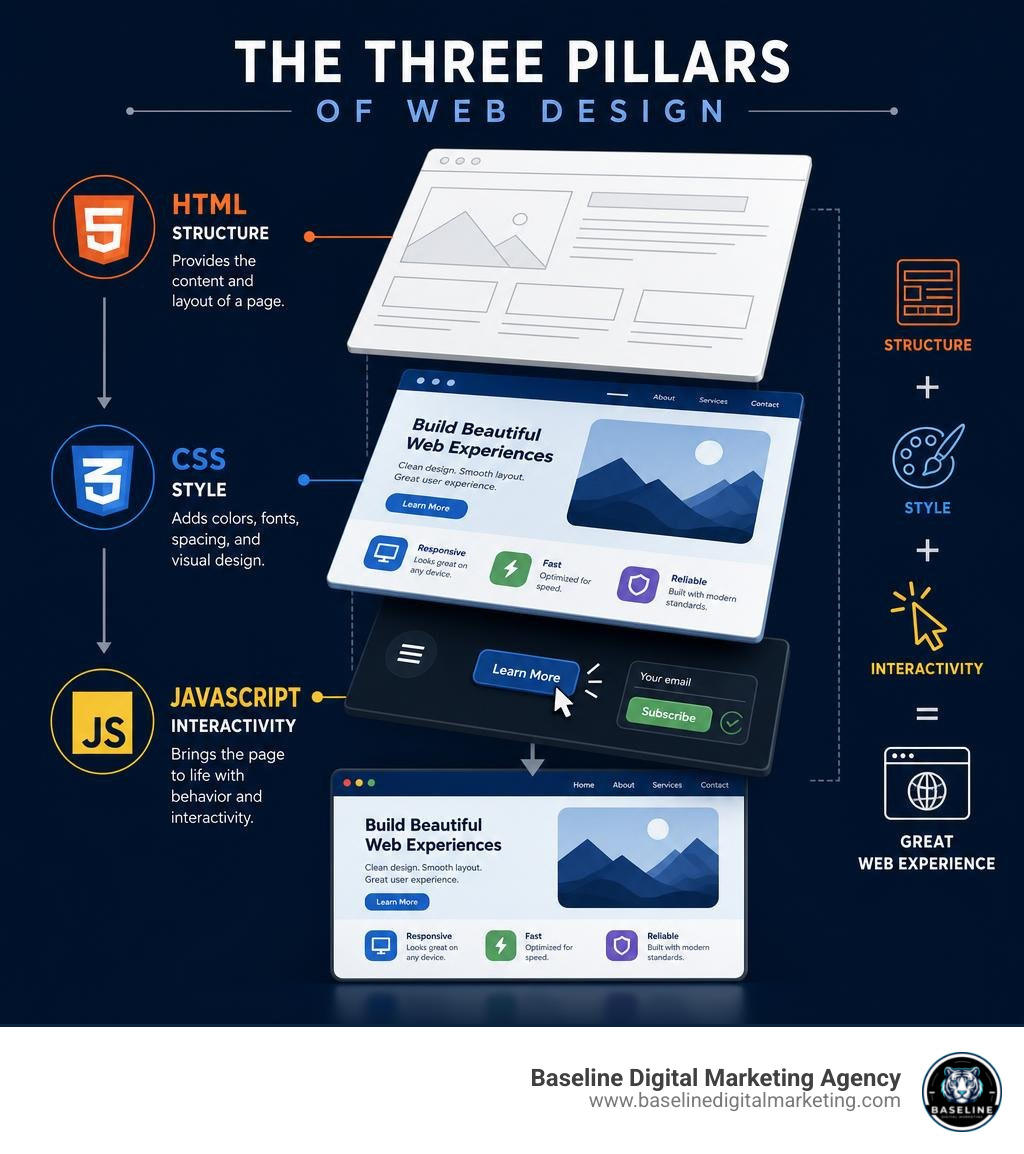
When we think about modern web design, we must realize that the only functionality of a web application that a user directly interacts with is through the front-end web page. You can have the most sophisticated database or server configuration in the world, but if your front-end implementation is poorly executed, your user will walk away. Today’s users expect web pages to load fast, expose the desired services clearly, and remain comfortable to view on every device.
To build sites that meet these expectations, we rely on three core pillars. Building high-performance sites doesn’t always require massive, heavy frameworks; in fact, you can discover How to Build Fast Sites in 2025 with Just HTML, CSS, and JavaScript to keep things incredibly lightweight, fast, and secure.
Understanding HTML as the Skeleton
HTML, or HyperText Markup Language, is the structural backbone of any webpage. Introduced by Tim Berners-Lee in 1991, HTML is not a programming language; rather, it is a markup language. It uses a series of tags and elements to define what content exists on the page—such as headings, paragraphs, images, links, and forms.
When writing HTML, we must follow valid document structure and elements nesting rules. Modern web design relies heavily on semantic HTML5 tags. Instead of wrapping everything in generic container divisions, we use elements like header, footer, article, and section. This semantic structure tells search engines and assistive technologies exactly what role each piece of content plays, which is a major factor in SEO performance. To dive deeper into these elements, we highly recommend bookmarking the MDN Web Docs for reliable, up-to-date documentation.
Styling the Skeleton with CSS
If HTML is the skeleton, CSS (Cascading Style Sheets) is the skin, clothing, and presentation layer. Proposed by Håkon Wium Lie in 1994, CSS allows us to control the color, size, positioning, typography, and layout of our HTML elements.
CSS works by targeting HTML tags with selectors and applying design rules to them. There are three physical ways to include CSS in an HTML document: inline styles directly on the HTML tags, internal stylesheets within a style tag in the head section, or external stylesheets linked via a link tag. For clean, maintainable web design, keeping your styles in an external stylesheet is the gold standard. If you want to understand how these choices affect your site’s architecture, you can explore the technical discussion on Where CSS can exist physically in a HTML file – SitePoint.
Bringing the Page to Life with JavaScript
JavaScript is the engine that brings a static page to life. It is a lightweight, interpreted, single-threaded programming language used to handle client-side behavior. While HTML and CSS lay out the visual interface, JavaScript handles actions: what happens when a user clicks a button, submits a form, or opens a mobile menu.
Through DOM (Document Object Model) manipulation, JavaScript can dynamically change HTML content and CSS styles on the fly without requiring a page reload. It listens for events—like clicks, scrolls, or keystrokes—and executes code in response. If you are visual learner looking to see this transition in real time, you can watch how to Build a Simple Website with HTML, CSS, JavaScript – YouTube to see the three technologies coordinate perfectly.
Core Skills and Essential Tools for Beginners in 2026
Starting your journey in web design does not require expensive software or high-end hardware. In 2026, the barrier to entry is lower than ever, yet the tooling has become incredibly powerful.
To build a solid foundation, you can start with the Front-End Web Development Quick Start With HTML5, CSS, and JavaScript course, which walks you through the initial setup and core mechanics of client-side programming.

Setting Up Your Development Environment
To write code efficiently, we need two primary tools: a text editor and a web browser.
- Visual Studio Code (VS Code): This is the industry-standard code editor. It is free, highly customizable, and offers extensions like Live Server, which lets you preview your HTML and CSS changes in the browser in real time.
- Browser Developer Tools: Built into modern browsers like Google Chrome and Firefox, DevTools are your best friend. By right-clicking any page and selecting “Inspect,” you can view the HTML structure, test CSS modifications live, and debug JavaScript errors in the console.
Version Control with Git and GitHub
We always advise new developers to start using Git from day one. Git is a version control system that tracks changes in your code files. GitHub is a cloud platform where you store these tracked files in repositories.
Learning Git is essential for modern development workflows. It allows you to create “commits” (saved historical points of your project), work on new features using “branches” without breaking your main code, and collaborate with other developers globally. A clean GitHub profile acts as your living resume, proving to potential clients and employers that you understand professional development practices.
The Evolution of Web Development and Modern Trends
Web development has undergone massive shifts over the last few decades. Understanding where the industry has been helps us navigate where it is going in 2026.
From Static HTML to Full-Stack Frameworks
In the early days of the web, websites consisted entirely of static HTML pages. If you wanted to change a navigation menu, you had to manually edit every single HTML file on your server.
Then came the era of jQuery and dynamic scripting, followed quickly by the rise of mobile-first responsive design. As user expectations grew, the industry shifted toward component-based JavaScript libraries like React. Today, in 2026, full-stack frameworks like Next.js have become the industry standard. These frameworks combine client-side rendering with server-side generation, ensuring that websites are both highly interactive and optimized for search engine visibility. To see how these technologies stack up in the current landscape, consult the comprehensive Web Developer Roadmap for Beginners | 2026 Guide | iZONE Labs.
The Role of AI Coding Assistants and TypeScript in 2026
In 2026, AI coding assistants (like GitHub Copilot and custom LLM integrations) are standard parts of a developer’s daily workflow. They serve as productivity multipliers, generating boilerplate code, suggesting optimizations, and speeding up debugging.
However, AI has not replaced the need for human developers. If anything, it has made a deep understanding of HTML, CSS, and JavaScript more critical. You must be able to critically evaluate, test, and debug the code that AI assistants generate. Alongside AI, TypeScript has become the standard in professional development, adding static typing to JavaScript to prevent bugs before code ever runs in a browser.
Building Responsive, Accessible, and Performant Websites
Building a website that only looks good on your personal laptop is no longer enough. Modern web design requires a holistic focus on responsiveness, accessibility, and speed.
| Goal | Key Techniques | Business Impact |
|---|---|---|
| Responsive Design | Viewport meta tag, Media Queries, Flexbox, CSS Grid | Retains mobile traffic (over 50% of web users) |
| Accessibility (a11y) | Semantic HTML, ARIA attributes, Color Contrast | Legal compliance, reaches wider audience |
| Performance | Image compression, INP & LCP optimization | Lower bounce rates, improved SEO rankings |
To stay updated on these core web platform standards, we regularly reference web.dev, Google’s official hub for web performance and user experience best practices.
Responsive Web Design Best Practices
To make web pages look good on all devices, we must design fluidly. This starts with setting the viewport meta tag in the HTML head section, which tells mobile browsers to scale the page to the device’s screen width.
Using CSS media queries, we can apply different styles at specific screen width breakpoints. For layouts, we move away from fixed pixel widths and leverage modern CSS layout tools:
- Flexbox: Best for one-dimensional layouts (like a horizontal navigation bar or a vertical list of cards).
- CSS Grid: Best for complex, two-dimensional layouts (like a multi-column page layout).
- Fluid Typography: Using viewport width units (vw) or relative units (rem) so text scales smoothly across devices.
Web Accessibility (a11y) for All Users
Web accessibility means ensuring that everyone, including people with visual, auditory, motor, or cognitive disabilities, can use your website.
We achieve this by writing semantic HTML, which screen readers can easily parse. Additionally, we ensure all interactive elements can be navigated entirely via keyboard, maintain a strong color contrast ratio, and use ARIA (Accessible Rich Internet Applications) attributes to provide context where standard HTML elements fall short.
Optimizing Performance and Core Web Vitals
Website speed is a direct business metric. If a page takes more than a few seconds to load, users will bounce. Google measures this user experience through Core Web Vitals:
- Largest Contentful Paint (LCP): Measures loading performance (how fast the main content renders).
- Interaction to Next Paint (INP): Measures page responsiveness to user inputs like clicks.
We optimize these metrics by compressing images, minifying our CSS and JavaScript files, and avoiding heavy, unnecessary scripts.
A Step-by-Step Web Developer Roadmap for Beginners
Learning web development can feel overwhelming, but breaking it down into structured phases makes it highly achievable. If you commit 15 to 20 hours per week, you can transition from absolute beginner to job-ready in roughly six months.
Phase 1: Foundations of Web Design (Months 1-2)
Your first two months should be dedicated entirely to the basics of layout and structure. Do not rush to learn programming yet. Focus on:
- How the web works (servers, clients, and DNS).
- HTML structure, semantic elements, and forms.
- CSS basics (selectors, colors, typography, and the box model).
- Responsive layout techniques using Flexbox and Grid.
For a highly structured curriculum during this phase, work through the modules on Learn web development | MDN.
Phase 2: Core Interactivity and Git (Months 3-4)
Once you can build a beautiful, responsive static page, it is time to make it interactive:
- Learn JavaScript fundamentals (variables, functions, loops, and data types).
- Master DOM manipulation and event handling.
- Learn Git version control and start pushing your projects to GitHub.
- Practice fetching data from public APIs to create dynamic web applications.
Phase 3: Advanced Tools and Frameworks (Months 5-6)
In the final phase, you will bridge the gap between hobbyist and professional:
- Learn React to build component-based user interfaces.
- Transition to Next.js for server-side rendering and SEO optimization.
- Build three complex, original portfolio projects.
- Deploy your projects to live hosting platforms like Vercel or Netlify.
Overcoming Common Beginner Challenges
Learning to code is as much a mental game as it is a technical one. Recognizing the common psychological traps will save you months of frustration.
Escaping Tutorial Hell
Tutorial hell is the state where you feel comfortable following along with a video tutorial, but the moment you face a blank code editor, you have no idea what to write.
To escape this, practice active learning. The moment you finish a tutorial, close it and try to rebuild the exact same project from memory. If you get stuck, don’t reopen the video immediately—use search engines, check documentation, and debug the issue yourself. Build small, original variations of what you just learned to solidify the concepts.
Managing Imposter Syndrome and Framework Fatigue
Imposter syndrome—the feeling that you aren’t smart enough or that you’re a fraud—is incredibly common, even among senior developers. Understand that coding is not about memorizing syntax; it is about problem-solving. It is completely normal to look up basic CSS rules or JavaScript methods daily.
Additionally, avoid framework fatigue. You do not need to learn every new tool that trend on social media. Focus deeply on vanilla HTML, CSS, and JavaScript. Once you master the fundamentals, transitioning to any new framework becomes a matter of days, not months.
Job Market Outlook and Career Paths in 2026
While hiring at massive tech conglomerates has stabilized, the demand for skilled web developers remains incredibly high across small and medium-sized businesses, local brands, and digital agencies.
The Realistic State of Junior Developer Hiring
In 2026, employers are looking for practical builders rather than certificate collectors. To stand out in the junior job market, your portfolio should not feature generic tutorial projects like todo apps. Instead, present real-world applications with case studies detailing the problems you solved, your technical decisions, and how you optimized the site’s performance.
Alternative Paths: Freelancing and Building Your Own Products
You do not need a traditional corporate job to build a successful career in web development. Many developers find immense success through:
- Local Freelancing: Helping local restaurants, retail shops, and professional services update their outdated websites. You can read The Complete Guide To Website Redesign Services to understand how to package and sell high-value web overhauls.
- Niche Templates & SaaS: Building and selling specialized website templates or small software-as-a-service utilities.
Signs You Are Ready for Professional Work
You are ready to look for professional work when you can:
- Take a visual design mockup (from a tool like Figma) and accurately build it using HTML and CSS.
- Solve coding errors independently using browser developer tools and documentation.
- Comfortably use Git to manage your project history.
- Build websites with the end-user in mind. For instance, knowing how to align your design with user behavior is crucial; you can learn more about this by reading Dont Redesign Blind How Buyer Personas Save Your Website From Flop Status.
Frequently Asked Questions about Web Design, HTML, CSS, and JavaScript
What is the fastest way to learn web design html css javascript?
The fastest way is through project-based learning. Do not spend months reading theory. Learn a basic concept, immediately build a small project with it, break it, fix it, and move on. Consistency of 30 to 60 minutes of daily practice is far more effective than cramming once a week.
Do I need a computer science degree to get a web development job in 2026?
No. While a degree can be helpful, the web development industry highly values practical skills, a strong portfolio, and demonstrated problem-solving abilities. Self-taught developers and bootcamp graduates secure roles constantly by showcasing live, high-performing projects on GitHub.
Is it still worth learning HTML, CSS, and JavaScript with the rise of AI?
Absolutely. AI coding assistants can generate code, but they cannot design user experiences, understand complex business logic, or debug subtle browser compatibility issues. Knowing the core technologies allows you to guide, correct, and implement AI-generated code effectively.
Conclusion
Mastering web design HTML, CSS, and JavaScript is an incredibly rewarding journey that opens doors to freelancing, full-time employment, and building your own digital products. The fundamentals of the web have remained stable for decades, and investing time in mastering them will pay dividends throughout your career.
As you build out your site’s visual identity, starting with structured systems saves massive amounts of time down the road. We dive deep into this strategy in our guide on Dont Start From Scratch Why Your Website Redesign Needs A Design System. For continuous learning and reference materials, make sure to explore the extensive Web development tutorials – MDN Web Docs | MDN .
If you are a business owner looking to build a high-performance, accessible, and beautiful website that ranks on Google without going through the learning curve yourself, we are here to help. Explore our professional Website Development Services at Baseline Digital Marketing Agency to see how we can turn your digital presence into a growth engine. Let’s build something incredible together!